Dell P2725H Monitor Review – Powerful 27″ 100Hz Display, USB-C & Ergonomic Design
Discover the Dell P2725H monitor in our detailed review. Explore the 27″ FHD IPS display, 100Hz refresh rate, USB-C connectivity, and ergonomic design for professionals.
Dell P2725H Monitor Key Specifications at a Glance
Table of Contents
-
Introduction of Dell P2725H Monitor
-
Stunning Display and Visual Performance of Dell P2725H Monitor
-
All‑Day Eye Comfort and Ergonomics of Dell P2725H Monitor
-
Comprehensive Connectivity and USB Hub of Dell P2725H Monitor
-
Dell Display Manager and Productivity Features of Dell P2725H Monitor
-
Sustainable Design and Environmental Responsibility of Dell P2725H Monitor
-
Real‑World User Feedback on Dell P2725H Monitor
-
Technical Specifications Summary of Dell P2725H Monitor
-
Pros and Cons of Dell P2725H Monitor
-
Frequently Asked Questions (FAQ) About Dell P2725H Monitor
-
Conclusion of Dell P2725H Monitor – Is It Worth It?
1. Introduction of Dell P2725H Monitor
In today’s modern workplace, the monitor you use is your primary window into the digital world, making clarity, comfort, and connectivity essential for productivity. The Dell P2725H monitor arrives as a purpose-built business display, engineered specifically for professionals who demand exceptional visual quality, all-day comfort, and seamless connectivity in a 27-inch form factor.
This versatile monitor combines a vibrant Full HD IPS panel with a smooth 100Hz refresh rate, extensive ergonomic adjustments, and a comprehensive port selection including USB-C, all while incorporating Dell’s commitment to sustainable design. Whether you’re analyzing spreadsheets, participating in video conferences, or managing complex workflows, the Dell P2725H monitor is designed to exceed expectations with every task.
The Dell P2725H monitor is engineered for professionals who demand the ultimate in display quality, comfort, and connectivity. Whether you are a business professional who needs a reliable monitor for productivity, a data analyst who requires excellent color accuracy and clarity, a remote worker who values ergonomic adjustability and all-day comfort, or an IT manager who appreciates sustainable design and comprehensive connectivity, this monitor is built to meet your needs.
The combination of a 27-inch FHD IPS display, 100Hz refresh rate, USB-C connectivity, and TÜV-certified eye comfort makes it one of the most capable and versatile business monitors available today.
For Android users, the Dell P2725H monitor integrates seamlessly with the Android ecosystem for connecting Android devices, enabling effortless screen mirroring, file sharing, and workflow continuity. The universal compatibility and thoughtful design make it a practical choice for professionals who want a monitor that works flawlessly across platforms.
If you are already using Dell products, you might also enjoy our collection of Dell monitors for more options.
Explore more premium monitors at our shop .
2. Stunning Display and Visual Performance of Dell P2725H Monitor
At the heart of the Dell P2725H monitor lies a 27-inch Full HD (1920 x 1080) IPS panel that delivers crisp, vibrant visuals with exceptional color accuracy.
Key display features:
-
27-inch IPS panel: Wide viewing angles, consistent colors.
-
Full HD resolution (1920×1080): Crisp, detailed visuals for productivity.
-
100Hz refresh rate: Smoother motion, less flicker, seamless scrolling.
-
300 nits brightness: Excellent readability in various lighting conditions.
-
1500:1 contrast ratio: Deeper blacks and brighter whites.
-
99% sRGB color gamut: Accurate color reproduction for business presentations and graphic design.
-
16.7 million colors: Vibrant, true-to-life visuals.
-
178° viewing angles: Consistent colors even when viewed from the side.
What the display offers:
-
Crisp visuals: Full HD resolution delivers detailed, sharp images.
-
Smooth motion: 100Hz refresh rate makes document navigation and web browsing noticeably more fluid.
-
Accurate colors: 99% sRGB coverage for color-critical tasks.
-
Wide viewing angles: IPS technology ensures consistent colors even from the side.
-
Excellent readability: 300 nits brightness and 1500:1 contrast ratio.
Display highlights:
-
27-inch IPS: Premium panel technology.
-
100Hz refresh rate: Smoother than standard 60Hz displays.
-
99% sRGB: Accurate color reproduction.
-
1500:1 contrast: Deeper blacks, brighter whites.
-
178° viewing angles: Perfect for collaborative work.
The IPS technology ensures wide 178-degree viewing angles both horizontally and vertically, meaning colors remain consistent and images stay clear even when viewed from the side—perfect for collaborative work or sharing your screen with colleagues.
Display benefits for professionals:
-
Productivity: Crisp, clear text for documents and spreadsheets.
-
Presentations: Accurate colors for business presentations.
-
Collaboration: Wide viewing angles for sharing with colleagues.
-
Comfort: 100Hz refresh rate reduces eye strain during extended use.
With 99% sRGB color gamut coverage and support for up to 16.7 million colors, this monitor provides accurate color reproduction suitable for business presentations, graphic design work, and everyday productivity tasks.
The 100Hz refresh rate is a standout feature that sets the Dell P2725H monitor apart from standard 60Hz office displays. This higher refresh rate delivers smoother motion, less flicker, and more seamless scrolling, making document navigation and web browsing noticeably more fluid.
The 5ms gray-to-gray response time ensures clear motion handling for everyday tasks. With 300 nits of brightness and a 1500:1 contrast ratio, the display provides deeper blacks and brighter whites for excellent readability in various lighting conditions.
For Android users, the stunning display provides an excellent canvas for productivity apps, video conferencing, and content consumption, seamlessly integrating with the Android ecosystem for a connected experience.
3. All‑Day Eye Comfort and Ergonomics of Dell P2725H Monitor
Dell has prioritized user wellness with the Dell P2725H monitor by incorporating TÜV Rheinland 4-star certified eye comfort features.
Key eye comfort features:
-
TÜV Rheinland 4-star certification: Industry-leading eye comfort.
-
ComfortView Plus: Reduces harmful blue light emissions to ≤35%.
-
No color sacrifice: Maintains color accuracy unlike traditional filters.
-
Anti-glare coating (3H hardness): Minimizes reflections, reduces eye strain.
-
Flicker-free technology: Reduces screen flicker for comfortable viewing.
What the eye comfort offers:
-
Extended viewing comfort: Work for hours without eye fatigue.
-
True-to-life colors: ComfortView Plus reduces blue light without yellowing.
-
Reduced reflections: Anti-glare coating minimizes distractions.
-
Healthy posture: Ergonomic adjustments promote proper posture.
Eye comfort highlights:
-
TÜV 4-star certified: Industry-leading comfort.
-
ComfortView Plus: ≤35% blue light, no color sacrifice.
-
Anti-glare coating: Reduces eye strain.
-
Flicker-free: Comfortable extended viewing.
The improved ComfortView Plus technology reduces harmful blue light emissions to ≤35% without sacrificing color accuracy—unlike traditional filters that shift colors to yellow. This allows for comfortable extended viewing sessions while maintaining true-to-life visuals.
The anti-glare coating with 3H hardness minimizes reflections and reduces eye strain in bright office environments.
Ergonomic features:
-
Height adjustment: Up to 150mm.
-
Tilt adjustment: -5° to +21°.
-
Swivel adjustment: ±45°.
-
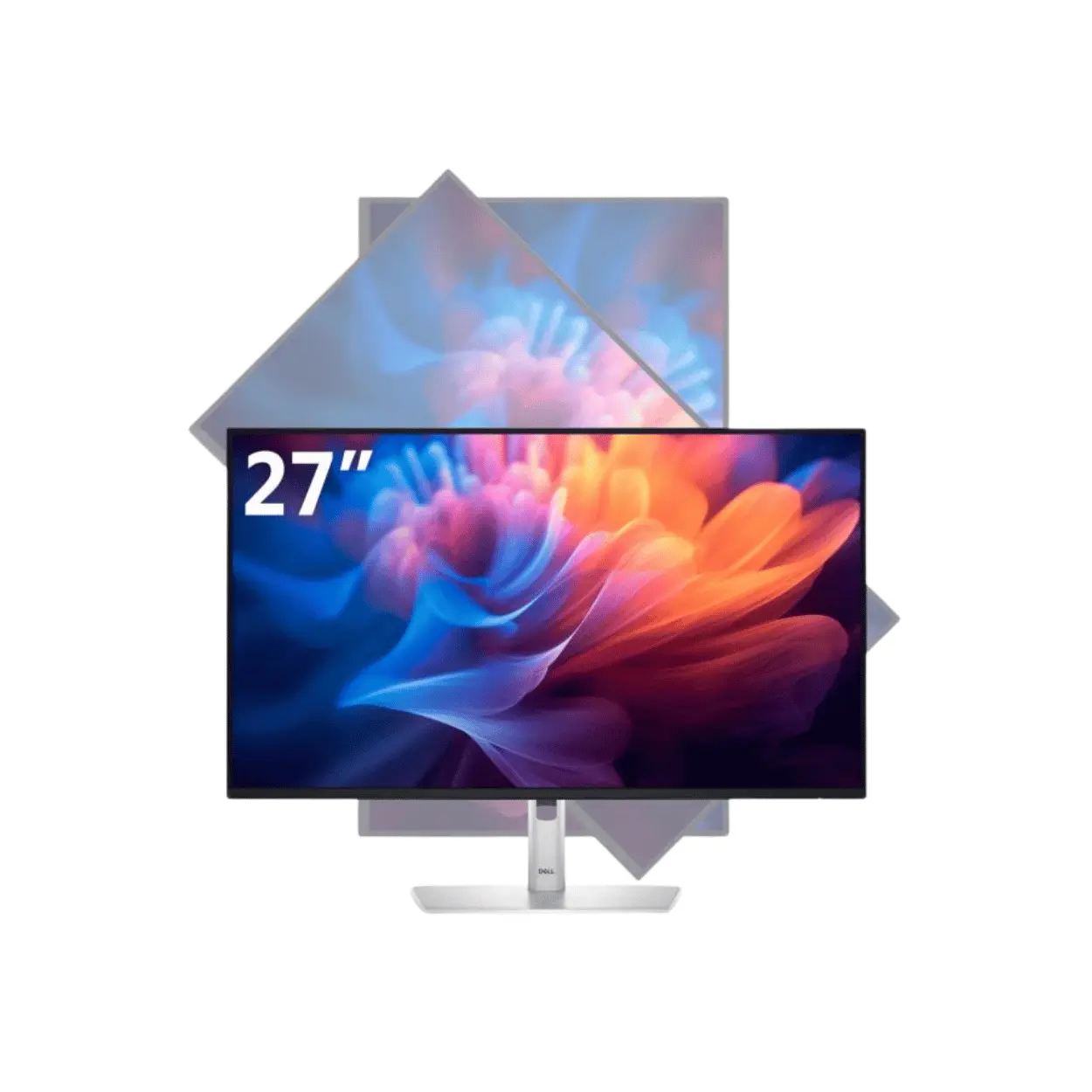
Pivot adjustment: 90° for portrait mode.
-
VESA compatible: 100mm x 100mm for mounting.
What the ergonomics offer:
-
Customized comfort: Adjust to your ideal viewing position.
-
Healthy posture: Reduces neck and shoulder fatigue.
-
Workspace flexibility: Portrait mode for coding and documents.
-
Mounting options: VESA compatible for arms or wall brackets.
Ergonomic highlights:
-
150mm height adjustment: Customizable viewing position.
-
90° pivot: Portrait mode for productivity.
-
±45° swivel: Flexible workspace setup.
-
VESA compatible: Easy mounting.
The ergonomic stand offers exceptional flexibility to customize your viewing position for maximum comfort throughout the workday. Users can adjust height up to 150mm, tilt from -5° to +21°, swivel up to 45° in either direction, and pivot 90° for portrait mode orientation.
This extensive adjustability helps maintain proper posture and reduces neck and shoulder fatigue during long work sessions. For workspace flexibility, the monitor is VESA compatible (100mm x 100mm) for mounting on arms or wall brackets.
For Android users, the ergonomic design ensures comfortable extended use when connecting Android devices to the Android ecosystem for productivity and collaboration.
4. Comprehensive Connectivity and USB Hub of Dell P2725H Monitor
Modern professionals require versatile connectivity options, and the Dell P2725H monitor delivers with a comprehensive port selection.
Key connectivity features:
-
HDMI 1.4: Video input with 100Hz support.
-
DisplayPort 1.2: Video input with 100Hz support.
-
VGA: Legacy device compatibility.
-
USB 3.2 Gen1 Type-B (upstream): Connect to computer.
-
3× USB 3.2 Gen1 Type-A (downstream): Connect peripherals.
-
USB 3.2 Gen1 Type-C (downstream): 15W power delivery for charging.
-
Integrated USB hub: Use as a docking station.
What the connectivity offers:
-
Versatile inputs: HDMI, DisplayPort, and VGA for modern and legacy devices.
-
Full 100Hz support: HDMI and DisplayPort support full refresh rate.
-
Docking station functionality: Connect peripherals directly to the monitor.
-
Device charging: USB-C with 15W power delivery.
-
Cable clutter reduction: One cable connects everything.
Connectivity highlights:
-
HDMI + DisplayPort + VGA: Comprehensive input options.
-
4× USB ports: Connect keyboard, mouse, and more.
-
USB-C with 15W PD: Charge mobile devices.
-
Integrated hub: Reduce cable clutter.
Video inputs include HDMI 1.4, DisplayPort 1.2, and VGA, ensuring compatibility with both modern and legacy devices. The HDMI and DisplayPort connections support Full HD resolution at the full 100Hz refresh rate.
USB hub features:
-
USB 3.2 Gen1 Type-B upstream: Connect to your computer.
-
3× USB 3.2 Gen1 Type-A downstream: Peripherals.
-
1× USB 3.2 Gen1 Type-C downstream: 15W power delivery.
What truly enhances productivity is the integrated USB hub functionality. The monitor features one USB 3.2 Gen1 Type-B upstream port, three USB 3.2 Gen1 Type-A downstream ports, and one USB 3.2 Gen1 Type-C downstream port that delivers up to 15W of power delivery for charging mobile devices.
This allows you to connect peripherals directly to the monitor and use it as a docking station for your laptop, reducing cable clutter on your desk.
Important note: The USB-C port is data-only and does not support video input, so you’ll need to use HDMI or DisplayPort for the primary video connection.
For users needing to collaborate across devices, seamless integration with platforms such as the Android ecosystem ensures effortless connectivity and charging.
The monitor ships with a DisplayPort cable and USB upstream cable included in the box, though users should note that an HDMI cable may need to be purchased separately depending on the configuration.
For Android users, the comprehensive connectivity ensures seamless integration with the Android ecosystem for connecting Android devices, screen mirroring, and file sharing.
5. Dell Display Manager and Productivity Features of Dell P2725H Monitor
The Dell P2725H monitor includes the improved Dell Display Manager software, which enhances multitasking and workflow efficiency.
Key productivity features:
-
Easy Arrange: Organize your screen with predefined window layouts.
-
Easy Arrange Memory: Save and recall your preferred screen configurations.
-
Menu launcher: Quick access to favorite features.
-
Hot keys: Convenient customization.
-
IT deployment: Smooth deployment with automatic features.
-
Update notifications: Automatic alerts for firmware and software updates.
-
Mac support: Dell Display and Peripheral Manager for Mac OS.
What the productivity features offer:
-
Enhanced multitasking: Organize windows efficiently.
-
Workflow efficiency: Save and recall screen configurations.
-
Quick access: Hot keys and menu launcher for favorite features.
-
IT-friendly: Smooth deployment for organizations.
-
Cross-platform: Support for both Windows and Mac.
Productivity highlights:
-
Easy Arrange: Predefined window layouts.
-
Easy Arrange Memory: Save preferred configurations.
-
Hot keys: Quick access to features.
-
Mac support: Dell Display and Peripheral Manager.
Easy Arrange allows you to organize your screen with predefined window layouts, while Easy Arrange Memory saves and recalls your preferred screen configurations. The software provides convenient customization with menu launcher and hot keys for quick access to favorite features.
IT deployment features:
-
Smooth deployment: Automatic features compatible with management tools.
-
Update notifications: Automatic alerts for new updates.
-
Compatibility: Works with several management tools.
IT administrators will appreciate the smooth deployment capabilities with automatic features that are compatible with several management tools. The software also provides automatic notifications when new monitor firmware or software updates are available.
For Mac OS users, Dell provides the Dell Display and Peripheral Manager software as an alternative, ensuring compatibility across platforms.
For Android users, the productivity features enhance workflow when connecting Android devices to the Android ecosystem for seamless collaboration.
6. Sustainable Design and Environmental Responsibility of Dell P2725H Monitor
Dell has incorporated significant sustainability considerations into the Dell P2725H monitor design.
Key sustainability features:
-
85% recycled plastics: Post-consumer recycled and closed-loop ITE-derived plastic.
-
50% recycled steel: Sustainable materials.
-
100% recycled aluminum: Premium sustainable construction.
-
20% recycled glass: Eco-friendly components.
-
Reduced plastic packaging: 100% renewable, fully recyclable materials.
-
PowerNap mode: Lowers energy use by up to 14.8%.
-
ENERGY STAR 8.0: Energy efficiency certification.
-
TCO Certified Edge: Prestigious sustainability certification.
-
EPEAT Gold with Climate+: Dell’s best practices around decarbonization.
What the sustainability offers:
-
Environmental responsibility: Reduced environmental impact.
-
Energy savings: PowerNap mode lowers energy consumption.
-
Certifications: Trusted sustainability certifications.
-
Eco-friendly packaging: Reduced plastic, recyclable materials.
Sustainability highlights:
-
85% recycled plastics: Sustainable materials.
-
100% recycled aluminum: Premium eco-friendly construction.
-
ENERGY STAR 8.0: Energy efficiency.
-
EPEAT Gold: Industry-leading sustainability.
-
PowerNap: Energy saving up to 14.8%.
The monitor is thoughtfully crafted with sustainable materials including 85% recycled plastics (combining post-consumer recycled plastic and closed-loop ITE-derived plastic), 50% recycled steel, 100% recycled aluminum, and at least 20% recycled glass.
Packaging sustainability:
-
Reduced plastic: Eco-friendly packaging.
-
100% renewable materials: Sustainable packaging.
-
Fully recyclable: Easy to recycle.
-
Fiber-based cushioning: Environmentally friendly.
The packaging ships with reduced plastic and comes in a box made with 100% renewable materials that is fully recyclable, as Dell shifts toward fiber-based cushioning solutions that are kinder to the environment.
Energy conservation:
-
PowerNap mode: Lowers energy use by up to 14.8%.
-
ENERGY STAR 8.0: Energy efficiency certification.
-
Efficient operation: 15.8W typical power consumption.
Energy conservation features include PowerNap mode in Dell Display Manager, which lowers energy use by up to 14.8%. The monitor carries prestigious environmental certifications including ENERGY STAR 8.0, TCO Certified Edge designation, and EPEAT Gold registration with Climate+—meeting Dell’s best practices around decarbonization.
For Android users, the sustainable design ensures that the Dell P2725H monitor is an environmentally responsible choice for the Android ecosystem .
7. Real‑World User Feedback on Dell P2725H Monitor
User feedback for the Dell P2725H monitor has been overwhelmingly positive, with ratings averaging 4.3 to 4.9 stars across multiple retailers.
User feedback highlights:
-
4.3 to 4.9 stars: Strong overall satisfaction.
-
“Amazing monitor in every way”: Quality and performance praised.
-
“Terrific”: Excellent value.
-
“Brilliant very good monitor”: Highly recommended.
-
“Perfect monitor screen quality”: Display excellence.
-
“Awesome” port selection: Comprehensive connectivity.
-
“Great monitor for work and casual gaming”: Versatile performance.
Display feedback:
One detailed user review highlights that the “monitor screen quality is perfect,” with excellent adjustability and port selection described as “awesome.”
Performance feedback:
Another customer notes it’s a “great monitor for work and casual gaming,” with the 100Hz refresh rate providing noticeably smoother motion.
Hands-on review:
A comprehensive hands-on review from Mercado Livre praises the image quality, vibrant colors, and excellent contrast, noting that the anti-glare surface effectively minimizes reflections.
Minor considerations:
-
No built-in speakers: External audio required.
-
HDMI cable not included: DisplayPort cable included.
-
16-amp power connector: Appropriate power setup needed.
-
USB-C data-only: No video input on USB-C.
Some users have noted minor considerations: the monitor does not include built-in speakers, and while a DisplayPort cable is included, an HDMI cable may need to be purchased separately.
One user mentioned that the power cable uses a 16-amp connector, so appropriate power setup is needed. Another reviewer pointed out that the USB-C port is data-only and does not support video input, so you’ll need to use HDMI or DisplayPort for the primary video connection.
For Android users, the positive feedback and long-term value make the Dell P2725H monitor a compelling choice, with seamless integration with the Android ecosystem for connected productivity.
8. Technical Specifications Summary of Dell P2725H Monitor
The Dell P2725H monitor features a comprehensive set of technical specifications for professional use.
Display specifications:
-
Panel: 27-inch IPS
-
Resolution: Full HD (1920×1080)
-
Refresh Rate: 100Hz
-
Response Time: 5ms (gray-to-gray, fast mode)
-
Brightness: 300 cd/m²
-
Contrast Ratio: 1500:1
-
Color Support: 16.7 million colors, 99% sRGB
-
Viewing Angles: 178° horizontal / 178° vertical
Physical specifications:
Ergonomic adjustments:
Power consumption:
Sustainability certifications:
-
ENERGY STAR 8.0
-
TCO Certified Edge
-
EPEAT Gold with Climate+
For Android users, the technical specifications ensure reliable performance when connecting Android devices to the Android ecosystem .
9. Pros and Cons of Dell P2725H Monitor
10. Frequently Asked Questions (FAQ) About Dell P2725H Monitor
Q1: What is the refresh rate of the Dell P2725H monitor?
A: The monitor features a 100Hz refresh rate, providing smoother motion, less flicker, and more seamless scrolling compared to standard 60Hz displays.
Q2: What is the resolution of the Dell P2725H monitor?
A: The monitor has a Full HD resolution of 1920 x 1080 pixels on a 27-inch IPS panel.
Q3: Does the USB-C port support video input?
A: No, the USB-C port is data-only and does not support video input. You’ll need to use HDMI or DisplayPort for the primary video connection.
Q4: Does the monitor have built-in speakers?
A: No, the Dell P2725H monitor does not include built-in speakers. You’ll need external speakers or headphones for audio.
Q5: What cables are included in the box?
A: The monitor ships with a DisplayPort cable and a USB upstream cable. An HDMI cable may need to be purchased separately.
Q6: Does the monitor have VESA mounting support?
A: Yes, the monitor is VESA compatible with a 100mm x 100mm mounting pattern for arms or wall brackets.
Q7: What are the ergonomic adjustments available?
A: The monitor offers height adjustment up to 150mm, tilt from -5° to +21°, swivel up to 45° in either direction, and pivot 90° for portrait mode.
Q8: Does the monitor support 100Hz refresh rate on all inputs?
A: The HDMI and DisplayPort connections support Full HD resolution at the full 100Hz refresh rate.
Q9: What is the color coverage of the monitor?
A: The monitor covers 99% of the sRGB color gamut with support for up to 16.7 million colors.
Q10: Does the monitor have eye comfort features?
A: Yes, it features TÜV Rheinland 4-star certification and ComfortView Plus technology, reducing harmful blue light emissions to ≤35% without sacrificing color accuracy.
Q11: Can the monitor be used as a docking station?
A: Yes, the integrated USB hub with 4 USB ports allows you to connect peripherals directly to the monitor and use it as a docking station for your laptop.
Q12: What is the brightness and contrast ratio?
A: The monitor offers 300 nits brightness and a 1500:1 contrast ratio for excellent readability in various lighting conditions.
Q13: Is the monitor energy efficient?
A: Yes, it features PowerNap mode lowering energy use by up to 14.8% and carries ENERGY STAR 8.0 and EPEAT Gold certifications.
Q14: What is the weight of the monitor?
A: The monitor weighs 4.03 kg without the stand, with a packaged weight of 8.47 kg.
Q15: Does the monitor support portrait mode?
A: Yes, the monitor pivots 90° for portrait mode orientation, ideal for coding, documents, and vertical content.
Q16: What is the typical power consumption?
A: The monitor consumes approximately 15.8 watts during typical operation.
Q17: Does the monitor have anti-glare coating?
A: Yes, the monitor features an anti-glare coating with 3H hardness that minimizes reflections and reduces eye strain in bright office environments.
Q18: Is the monitor compatible with Mac OS?
A: Yes, Dell provides the Dell Display and Peripheral Manager software for Mac OS users.
Q19: What sustainability features does the monitor offer?
A: The monitor uses 85% recycled plastics, 50% recycled steel, 100% recycled aluminum, and at least 20% recycled glass, with packaging using 100% renewable materials.
Q20: Is the Dell P2725H monitor compatible with Android devices?
A: Yes, it integrates seamlessly with the Android ecosystem for connecting Android devices, enabling screen mirroring and file sharing.
11. Conclusion of Dell P2725H Monitor – Is It Worth It?
The Dell P2725H monitor stands as an exceptional choice for business professionals seeking a versatile, comfortable, and feature-rich display for their workspace. Its combination of a vibrant 27-inch Full HD IPS panel with smooth 100Hz refresh rate delivers outstanding visual clarity for all productivity tasks.
The 27-inch IPS display with 99% sRGB coverage provides crisp, accurate visuals for business presentations, graphic design work, and everyday productivity. The 100Hz refresh rate delivers noticeably smoother motion, less flicker, and more seamless scrolling, making document navigation and web browsing significantly more fluid than standard 60Hz displays.
The TÜV-certified ComfortView Plus technology ensures all-day viewing comfort with ≤35% blue light emissions without sacrificing color accuracy, while the fully ergonomic stand with extensive adjustability promotes healthy posture. The 150mm height adjustment, tilt, swivel, and 90° pivot options allow you to customize your viewing position for maximum comfort throughout the workday.
With comprehensive connectivity including HDMI, DisplayPort, VGA, and USB-C with 15W power delivery, along with an integrated USB hub, this monitor serves as a true productivity hub. The Dell Display Manager software enhances multitasking with easy window organization and screen configuration management.
Backed by Dell’s commitment to sustainable design with 85% recycled plastics, 100% recycled aluminum, and prestigious environmental certifications including ENERGY STAR 8.0, TCO Certified Edge, and EPEAT Gold, the Dell P2725H monitor is engineered for the modern workplace.
For Android users, the Dell P2725H monitor integrates seamlessly with the Android ecosystem for connecting Android devices, enabling effortless screen mirroring, file sharing, and workflow continuity.
For any professional looking to enhance their daily workflow with an exceptional and dependable business display, the Dell P2725H monitor is a wise and smart choice.
Visit our shop for the best deals on Dell monitors and accessories.


 Pick up from the GEA Store
 Courier delivery
 DHL Courier delivery
 Warranty 1 year

 Enquire Now
This product has multiple variants. The options may be chosen on the product page
Enquire Now
This product has multiple variants. The options may be chosen on the product page

Reviews
Clear filtersThere are no reviews yet.