Dell 27 Video Conferencing Monitor P2724DEB Review – Powerful 2K Webcam, Dual Speakers & Seamless Connectivity
Dell 27 Video Conferencing Monitor P2724DEB Key Specifications at a Glance
Table of Contents
-
Introduction of Dell 27 Video Conferencing Monitor P2724DEB
-
Integrated Video Conferencing Excellence of Dell 27 Video Conferencing Monitor P2724DEB
-
Seamless Access and Enhanced Security of Dell 27 Video Conferencing Monitor P2724DEB
-
Stunning Display of Dell 27 Video Conferencing Monitor P2724DEB with Ergonomic Design
-
Comprehensive Connectivity of Dell 27 Video Conferencing Monitor P2724DEB
-
Enhanced Manageability and Sustainability of Dell 27 Video Conferencing Monitor P2724DEB
-
Real-World Considerations of Dell 27 Video Conferencing Monitor P2724DEB
-
What’s in the Box
-
Pros and Cons of Dell 27 Video Conferencing Monitor P2724DEB
-
Frequently Asked Questions About Dell 27 Video Conferencing Monitor P2724DEB
-
Conclusion – Is the Dell 27 Video Conferencing Monitor P2724DEB Worth It?
1. Introduction of Dell 27 Video Conferencing Monitor P2724DEB
In today’s hybrid work environment, professionals need more than just a screen—they need a complete collaboration hub that streamlines meetings and boosts productivity. The Dell 27 Video Conferencing Monitor P2724DEB arrives as a purpose‑built solution, engineered specifically for business users who demand seamless communication and workspace efficiency in a sleek 27‑inch form factor. This innovative display integrates a powerful 2K QHD webcam with Sony STARVIS sensor, dual 5W speakers, echo‑cancelling microphones, and a suite of productivity features, all certified for both Microsoft Teams and Zoom. Whether you’re leading client presentations, collaborating with remote teams, or managing complex workflows, the Dell 27 Video Conferencing Monitor P2724DEB is designed to exceed expectations with every task.
The Dell 27 Video Conferencing Monitor P2724DEB is engineered for professionals who demand seamless communication, workspace efficiency, and premium display quality. Whether you are a business professional who needs a complete video conferencing solution, a remote worker who values integrated webcam and audio, an IT manager who requires enterprise‑grade manageability and security, or someone who simply wants a productivity hub with USB‑C power delivery and KVM switch, this monitor is built to meet your needs.
The combination of a 2K QHD webcam with Sony STARVIS sensor, dual 5W speakers, 27‑inch QHD IPS display, and comprehensive connectivity options makes it one of the most capable and versatile video conferencing monitors available today.
For Android users, the Dell 27 Video Conferencing Monitor P2724DEB integrates seamlessly with the Android ecosystem through Dell Peripheral Manager, enabling effortless customization of camera settings, AI Auto Framing, and presets. The universal compatibility and thoughtful design make it a practical choice for professionals who want a monitor that works flawlessly with their devices.
If you are already using Dell products, you might also enjoy our collection of Dell monitors for more options.
Explore more business displays at our shop .
2. Integrated Video Conferencing Excellence of Dell 27 Video Conferencing Monitor P2724DEB
The standout feature of the Dell 27 Video Conferencing Monitor P2724DEB is its comprehensive built‑in conferencing system. The 2K QHD webcam utilizes a large Sony STARVIS sensor that is 29.5% larger than previous models, capturing vibrant, clear images even in challenging low‑light conditions.
Key video conferencing features:
-
2K QHD webcam: Sony STARVIS sensor for vibrant, clear images.
-
29.5% larger sensor: Superior low‑light performance.
-
Advanced Noise Reduction: Temporal (3D) and Spatial (2D) technology.
-
AI Auto Framing: Intelligently keeps you centered in the frame.
-
Dual 5W speakers: Immersive, high‑quality audio.
-
Dual echo‑cancelling microphones: Crystal‑clear voice capture.
-
Manual webcam shutter: Complete privacy control.
-
Microphone mute button: Convenient privacy management.
What the video conferencing offers:
-
Professional video quality: Clear images even in low light.
-
Immersive audio: Dual 5W speakers for high‑quality sound.
-
Crystal‑clear voice: Echo‑cancelling microphones for clear calls.
-
Privacy control: Manual shutter and mute button for peace of mind.
Advanced Temporal (3D) and Spatial (2D) Noise Reduction technology automatically eliminates motion blur and grainy images, while AI Auto Framing intelligently keeps you centered in the frame as you move around.
Video quality highlights:
-
Sony STARVIS sensor: Superior low‑light performance.
-
Noise Reduction: Eliminates motion blur and grain.
-
AI Auto Framing: Keeps you centered during movement.
-
Clear image: Vibrant, professional video quality.
For audio, dual 5W speakers strategically positioned at the top of the monitor deliver immersive sound, and dual echo‑cancelling microphones ensure crystal‑clear voice capture. The manual webcam shutter and convenient microphone mute button provide complete privacy control, ensuring you only share what you intend to.
Audio highlights:
-
Dual 5W speakers: Positioned at the top for immersive sound.
-
Echo‑cancelling microphones: Clear voice capture.
-
Mute button: Convenient privacy management.
-
Professional audio: High‑quality sound for meetings.
For Android users, the integrated video conferencing excellence ensures that your virtual meetings are professional and seamless, seamlessly integrating with the Android ecosystem for a connected experience.
3. Seamless Access and Enhanced Security of Dell 27 Video Conferencing Monitor P2724DEB
The Dell 27 Video Conferencing Monitor P2724DEB streamlines your workflow with Dell Express Sign‑in, featuring a proximity sensor that detects your presence and uses Windows Hello for automatic, secure login. When you walk away, the system locks automatically, enhancing security in shared workspaces.
Key security and access features:
-
Dell Express Sign‑in: Proximity sensor for automatic login.
-
Windows Hello: Secure facial recognition.
-
Automatic lock: System locks when you walk away.
-
Quick‑access touch controls: Answer/end calls, volume, mute.
-
Microsoft Teams certified: Seamless integration.
-
Zoom compatible: Versatile video conferencing support.
-
Skype for Business support: Broad compatibility.
What the security and access offers:
-
Convenient login: Automatic, secure sign‑in with Windows Hello.
-
Enhanced security: System locks when you walk away.
-
Quick meeting control: Touch controls for calls and volume.
-
Broad compatibility: Certified for Teams, Zoom, and Skype.
Quick‑access touch controls on the monitor bezel support all major meeting functions—answer or end calls, adjust volume, and mute or unmute your microphone with a single tap.
Access highlights:
-
Proximity sensor: Automatic detection for login.
-
Windows Hello: Secure facial recognition.
-
Touch controls: Quick meeting management.
-
One‑tap operation: Answer, end, mute, and volume.
These controls work seamlessly with Microsoft Teams and are also compatible with Skype for Business and Zoom, making this monitor a versatile communication hub.
For Android users, the seamless access and enhanced security ensure that your workspace is both convenient and protected, seamlessly integrating with the Android ecosystem for a connected experience.
4. Stunning Display of Dell 27 Video Conferencing Monitor P2724DEB with Ergonomic Design
The 27‑inch QHD (2560 x 1440) IPS panel delivers exceptional visual clarity with wide 178‑degree viewing angles and 99% sRGB color gamut coverage for accurate color reproduction.
Key display features:
-
27‑inch QHD IPS panel: Exceptional visual clarity.
-
2560 x 1440 resolution: Sharp, detailed visuals.
-
99% sRGB color gamut: Accurate color reproduction.
-
350 nits brightness: Bright, vibrant display.
-
1000:1 contrast ratio: Excellent detail in dark and bright areas.
-
178° viewing angles: Consistent colors from any angle.
-
ComfortView Plus: Always‑on low blue light filter.
-
150mm height adjustment: Customizable viewing position.
-
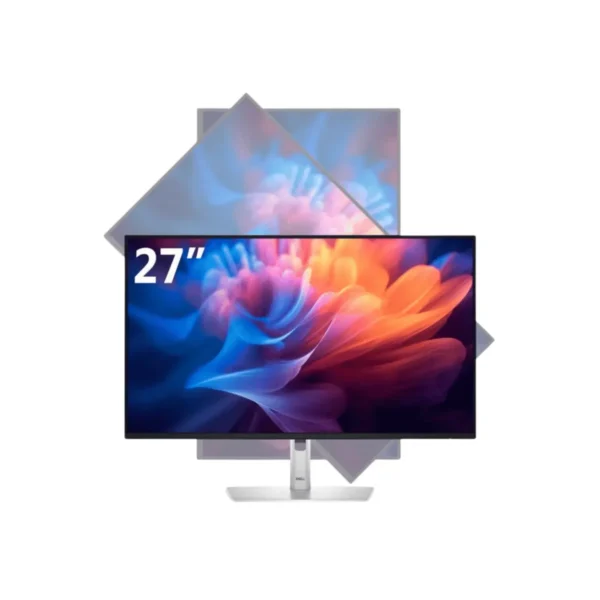
Tilt, swivel, pivot: Full ergonomic adjustability.
What the display offers:
-
Sharp visuals: QHD resolution for crisp, detailed images.
-
Accurate colors: 99% sRGB for professional color work.
-
Bright display: 350 nits for vibrant, clear visuals.
-
Eye comfort: ComfortView Plus without color distortion.
-
Ergonomic comfort: Full adjustability for long work sessions.
With 350 nits brightness and a 1000:1 contrast ratio, the display provides crisp, vibrant visuals suitable for professional work. Dell’s ComfortView Plus technology offers an always‑on, built‑in low blue light filter that reduces eye strain without compromising color accuracy—unlike traditional filters that shift colors to yellow.
Display highlights:
-
QHD resolution: Sharp, detailed visuals for productivity.
-
99% sRGB: Accurate color for professional work.
-
ComfortView Plus: Eye comfort without color distortion.
-
350 nits: Bright, vibrant display.
The ergonomic stand provides 150mm height adjustment, tilt, swivel, and 90‑degree pivot capabilities, allowing you to customize your viewing position for maximum comfort during long work sessions.
For Android users, the stunning display provides an excellent canvas for productivity apps, video conferencing, and content consumption, seamlessly integrating with the Android ecosystem for a connected experience.
5. Comprehensive Connectivity of Dell 27 Video Conferencing Monitor P2724DEB
The Dell 27 Video Conferencing Monitor P2724DEB transforms into a powerful productivity hub with extensive connectivity options. The USB‑C port delivers up to 90W of power delivery, charging your laptop while transmitting video, data, and audio through a single cable.
Key connectivity features:
-
USB‑C with 90W power delivery: Single‑cable charging and data.
-
RJ45 Ethernet: Reliable wired network connectivity.
-
Built‑in KVM switch: Control two PCs with one keyboard and mouse.
-
HDMI 1.4: Connect modern devices.
-
DisplayPort 1.4: High‑quality video connectivity.
-
DP‑out with MST: Daisy‑chain a second monitor.
-
USB 3.2 Gen1 downstream: Multiple USB ports for peripherals.
-
USB‑C downstream (15W): Fast charging for mobile devices.
What the connectivity offers:
-
Single‑cable solution: USB‑C with 90W power delivery.
-
Reliable networking: RJ45 Ethernet for secure connectivity.
-
Multi‑PC control: KVM switch for two PCs.
-
Versatile ports: HDMI, DisplayPort, USB, and MST.
-
Mobile charging: 15W USB‑C for smartphones and tablets.
The RJ45 Ethernet port provides reliable, secure wired network connectivity, while the built‑in KVM switch allows you to control two connected PCs with a single keyboard and mouse.
Connectivity highlights:
-
90W USB‑C: Charge and connect with a single cable.
-
KVM switch: Control two PCs with one setup.
-
MST daisy‑chaining: Connect a second monitor.
-
15W USB‑C: Fast charge mobile devices.
Additional ports include HDMI 1.4, DisplayPort 1.4, DP‑out with MST for daisy‑chaining a second monitor, multiple USB 3.2 Gen1 downstream ports, and a USB‑C downstream port with up to 15W charging for mobile devices.
Productivity benefits:
-
Clutter‑free workspace: Single‑cable connection.
-
Multi‑PC management: KVM switch for efficiency.
-
Expandable setup: Daisy‑chain a second monitor.
-
Device charging: 15W USB‑C for smartphones.
For users needing to collaborate across devices, the seamless integration with mobile platforms such as the Android ecosystem through Dell Peripheral Manager ensures effortless customization of camera settings, AI Auto Framing, and presets.
For Android users, the comprehensive connectivity ensures that you stay connected and productive, seamlessly integrating with the Android ecosystem for a connected experience.
6. Enhanced Manageability and Sustainability of Dell 27 Video Conferencing Monitor P2724DEB
IT administrators will appreciate the advanced manageability features of the Dell 27 Video Conferencing Monitor P2724DEB.
Key manageability features:
-
MAC Address pass‑through: Simplified network management.
-
PXE Boot: Remote boot and deployment.
-
Wake‑on‑LAN: Remote power management.
-
Dell Display Manager: Easy screen organization.
-
Easy Arrange: Quick screen layout.
-
Profile saving: Customized settings.
What the manageability offers:
-
Simplified deployment: Remote boot and management.
-
Easy setup: PXE Boot for enterprise deployment.
-
Network management: MAC Address pass‑through.
-
Screen organization: Easy Arrange and profile saving.
Sustainability features:
-
85% post‑consumer recycled plastic: Eco‑friendly construction.
-
90% recycled aluminum: Sustainable materials.
-
100% renewable packaging: Recyclable materials.
-
ENERGY STAR certified: Energy efficiency.
-
TCO Certified Edge: Sustainable certification.
-
EPEAT Gold registered: Highest environmental rating.
What the sustainability offers:
-
Environmental commitment: 85% recycled plastic and 90% recycled aluminum.
-
Eco‑friendly packaging: 100% renewable materials.
-
Energy efficiency: ENERGY STAR certified.
-
Sustainable certification: TCO and EPEAT Gold.
Dell Display Manager enables easy screen organization with Easy Arrange and profile saving. The Dell 27 Video Conferencing Monitor P2724DEB also demonstrates strong environmental commitment, incorporating 85% post‑consumer recycled plastic in the design and 90% recycled aluminum.
Sustainability highlights:
-
85% recycled plastic: Eco‑friendly construction.
-
90% recycled aluminum: Sustainable materials.
-
ENERGY STAR: Energy efficient.
-
EPEAT Gold: Highest environmental rating.
The packaging uses 100% renewable, recyclable materials, and the monitor is ENERGY STAR certified, TCO Certified Edge, and EPEAT Gold registered.
For Android users, the enhanced manageability and sustainability ensure that your workspace is both efficient and environmentally responsible, seamlessly integrating with the Android ecosystem for a connected experience.
7. Real-World Considerations of Dell 27 Video Conferencing Monitor P2724DEB
User feedback for the Dell 27 Video Conferencing Monitor P2724DEB has been overwhelmingly positive, with reviewers praising its comprehensive feature set and excellent build quality.
Key user feedback themes:
-
Comprehensive feature set: All‑in‑one collaboration solution.
-
Excellent build quality: Premium construction.
-
ComfortView Plus: Eye comfort without color distortion.
-
Video quality: Clear images in low light.
-
Audio quality: Immersive sound and clear voice.
One detailed review noted that the monitor “provides the specially tailored IPS monitor for it” regarding videoconferencing, and highlighted that the ComfortView Plus filter “does not affect the color accuracy.”
User testimonials:
-
Reviewer: “Specially tailored IPS monitor for videoconferencing.”
-
Reviewer: “ComfortView Plus does not affect color accuracy.”
-
Positive feedback: Excellent build quality and features.
However, some users have reported minor issues with USB‑C connectivity when switching inputs, noting that the monitor occasionally displays “No USB connection found” and requires a laptop reboot to restore functionality. This appears to be an isolated concern rather than a widespread issue.
Considerations:
-
USB‑C connectivity: Occasional input switching issues.
-
Laptop reboot: Required to restore connectivity.
-
Isolated concern: Not a widespread issue.
For Android users, the real‑world considerations demonstrate that the Dell 27 Video Conferencing Monitor P2724DEB is a reliable and feature‑rich monitor, seamlessly integrating with the Android ecosystem for a connected office experience.
8. What’s in the Box
When you purchase the Dell 27 Video Conferencing Monitor P2724DEB, you can expect:
9. Pros and Cons of Dell 27 Video Conferencing Monitor P2724DEB
10. Frequently Asked Questions About Dell 27 Video Conferencing Monitor P2724DEB
Q1: What is the resolution of the Dell 27 Video Conferencing Monitor P2724DEB?
A: It features a 27‑inch QHD (2560 x 1440) IPS display with 99% sRGB color gamut.
Q2: Does it have a built‑in webcam?
A: Yes, it features a 2K QHD webcam with Sony STARVIS sensor and AI Auto Framing.
Q3: Does it have built‑in speakers?
A: Yes, it has dual 5W speakers positioned at the top of the monitor for immersive sound.
Q4: Does it have a microphone?
A: Yes, it features dual echo‑cancelling microphones for crystal‑clear voice capture.
Q5: Is the Dell P2724DEB certified for Microsoft Teams?
A: Yes, it is certified for Microsoft Teams and compatible with Zoom and Skype for Business.
Q6: Does it have a privacy shutter?
A: Yes, it features a manual webcam shutter for complete privacy control.
Q7: Does it support USB‑C power delivery?
A: Yes, the USB‑C port delivers up to 90W of power delivery for charging laptops.
Q8: Does it have a KVM switch?
A: Yes, the built‑in KVM switch allows you to control two connected PCs with a single keyboard and mouse.
Q9: Does it support daisy‑chaining monitors?
A: Yes, the DP‑out with MST supports daisy‑chaining a second monitor.
Q10: Does it have an Ethernet port?
A: Yes, it features an RJ45 Ethernet port for reliable wired network connectivity.
Q11: Does it have ComfortView Plus?
A: Yes, it features always‑on ComfortView Plus technology that reduces eye strain without color distortion.
Q12: Is the Dell P2724DEB compatible with Android devices?
A: Yes, it integrates seamlessly with the Android ecosystem through Dell Peripheral Manager.
Q13: What is the warranty on the Dell P2724DEB?
A: It comes with a standard Dell warranty.
Q14: Does it have a height‑adjustable stand?
A: Yes, the ergonomic stand provides 150mm height adjustment, tilt, swivel, and 90° pivot.
Q15: Is the Dell P2724DEB environmentally friendly?
A: Yes, it incorporates 85% post‑consumer recycled plastic, 90% recycled aluminum, and is EPEAT Gold registered.
11. Conclusion – Is the Dell 27 Video Conferencing Monitor P2724DEB Worth It?
The Dell 27 Video Conferencing Monitor P2724DEB stands as the ultimate choice for business professionals seeking an all‑in‑one collaboration display that eliminates the clutter of external webcams, speakers, and microphones. Its combination of a 2K QHD webcam with Sony STARVIS sensor, dual 5W speakers, and AI‑enhanced audio delivers an exceptional conferencing experience. The 27‑inch QHD IPS panel with ComfortView Plus provides stunning visuals while protecting your eyes, and comprehensive connectivity including USB‑C with 90W power delivery transforms this monitor into a true productivity hub.
The Dell Express Sign‑in with Windows Hello provides seamless, secure login, while the built‑in KVM switch and MST daisy‑chaining enable efficient multi‑PC workflows. The enterprise‑grade manageability features, including PXE Boot and Wake‑on‑LAN, simplify deployment across fleets, making it an ideal choice for IT administrators.
With enterprise‑grade security features, extensive manageability options, and a commitment to sustainable design with 85% recycled plastic and EPEAT Gold certification, the Dell 27 Video Conferencing Monitor P2724DEB is engineered for the modern hybrid workplace.
For Android users, the Dell 27 Video Conferencing Monitor P2724DEB integrates seamlessly with the Android ecosystem through Dell Peripheral Manager, enabling effortless customization of camera settings and AI Auto Framing.
For any organization looking to empower their team with the ultimate video conferencing solution, the Dell 27 Video Conferencing Monitor P2724DEB is a wise and smart choice.
Visit our shop for the best deals on Dell monitors and business accessories.


 Pick up from the GEA Store
 Courier delivery
 DHL Courier delivery

 Warranty 1 year

 Enquire Now
This product has multiple variants. The options may be chosen on the product page
Enquire Now
This product has multiple variants. The options may be chosen on the product page

Reviews
Clear filtersThere are no reviews yet.