KW11 Kids Smart Watch Review – Powerful Safe GPS Tracker for Children
KW11 Kids Smart Watch Key Specifications at a Glance
Table of Contents
-
Introduction of KW11 Kids Smart Watch
-
Reliable Location Tracking of KW11 Kids Smart Watch with Multiple Technologies
-
Clear 1.4‑inch IPS Touchscreen of KW11 Kids Smart Watch
-
Two‑Way Video Calling and Voice Communication of KW11 Kids Smart Watch
-
Secure and Durable Design of KW11 Kids Smart Watch
-
Parent‑Controlled Safety Features of KW11 Kids Smart Watch
-
Long Battery Life and Practical Usage of KW11 Kids Smart Watch
-
What’s in the Box
-
Pros and Cons of KW11 Kids Smart Watch
-
Frequently Asked Questions (FAQ)
-
Conclusion
1. Introduction of KW11 Kids Smart Watch
In today’s connected world, parents seek peace of mind knowing their children are safe while allowing them a degree of independence. The KW11 Kids Smart Watch arrives as a purpose‑built solution, engineered specifically for families who want reliable location tracking, secure communication, and durable design in a device that kids will love to wear. Combining GPS, Wi‑Fi, and LBS positioning with video calling and a vibrant touchscreen, this smartwatch is designed to keep parents connected to their children without overwhelming them with unnecessary features, ensuring safety and peace of mind for the whole family.
The KW11 Kids Smart Watch is engineered for parents who want to stay connected with their children while giving them the freedom to explore and learn. Whether you are a parent who wants to know your child’s location during school hours, a caregiver who needs to stay in touch with a child after school, a family who values safety during outdoor activities, or someone who wants to introduce technology to children in a controlled and secure way, this smartwatch is built to meet your needs.
The combination of GPS, Wi-Fi, and LBS tracking, two-way video calling, and parent-controlled safety features makes it one of the most reliable and practical kids’ smartwatches available, ensuring you always know where your child is and that they can reach you when they need to.
For Android users, the companion app integrates seamlessly with the Android ecosystem, offering a familiar, user‑friendly experience for managing your child’s watch. The universal compatibility and thoughtful design make it a practical choice for families using Android devices. Whether you are using a Samsung Galaxy, Google Pixel, or any other Android phone, the KW11 Kids Smart Watch delivers reliable performance that adapts to your family’s needs.
If you are already using Havit products, you might also enjoy our collection of Havit smartwatches for more options.
Explore more wearables at our shop.
2. Reliable Location Tracking of KW11 Kids Smart Watch with Multiple Technologies
The KW11 Kids Smart Watch integrates multiple positioning systems to provide accurate, real‑time location updates. GPS offers precision within 5‑15 meters in open areas, while Wi‑Fi positioning maintains accuracy between 30‑50 meters in urban environments. For broader coverage, LBS (Location‑Based Service) uses cellular towers to provide location data within a radius of approximately 1000 meters.
Location tracking technologies:
-
GPS (Global Positioning System): Precision within 5‑15 meters in open areas – ideal for parks, fields, and outdoor spaces.
-
Wi‑Fi positioning: Accuracy between 30‑50 meters in urban environments – works in areas with Wi‑Fi networks.
-
LBS (Location‑Based Service): Coverage within approximately 1000 meters – uses cellular towers for broader coverage.
-
Multi‑technology combination: Ensures reliable location tracking in various environments.
What the location tracking offers:
-
Real‑time location updates: Know where your child is at any moment.
-
Accurate positioning: Multiple technologies work together for precise location data.
-
Indoor and outdoor coverage: Track your child whether they are at school, in the park, or at home.
-
Peace of mind: Always know your child’s whereabouts with confidence.
This combination ensures that parents can track their child’s whereabouts reliably, whether they’re at school, in the park, or on a family outing. The multi-technology approach means that even if one system is less accurate in a particular environment, the others can compensate.
How the tracking works:
-
GPS satellites: Provide precise outdoor location data.
-
Wi‑Fi networks: Help pinpoint location in urban areas.
-
Cellular towers: Offer broader coverage through LBS.
-
Smart algorithms: Combine data from all sources for accurate positioning.
All location data is accessible through a dedicated parent app, which displays the child’s location on a map, sets safe zones, and sends instant alerts when the watch enters or leaves designated areas. The KW11 Kids Smart Watch gives parents confidence while giving children the freedom to explore within safe boundaries.
Location history features:
-
View location history: See where your child has been throughout the day.
-
Track movements: Monitor your child’s route to and from school.
-
Identify patterns: Understand your child’s daily routine.
-
Peace of mind: Know that your child is safe and where they should be.
For Android users, the location tracking features integrate seamlessly with the Android ecosystem, providing accurate, real‑time location updates directly on your smartphone. The companion app makes it easy to view your child’s location, set safe zones, and receive instant alerts.
3. Clear 1.4‑inch IPS Touchscreen of KW11 Kids Smart Watch
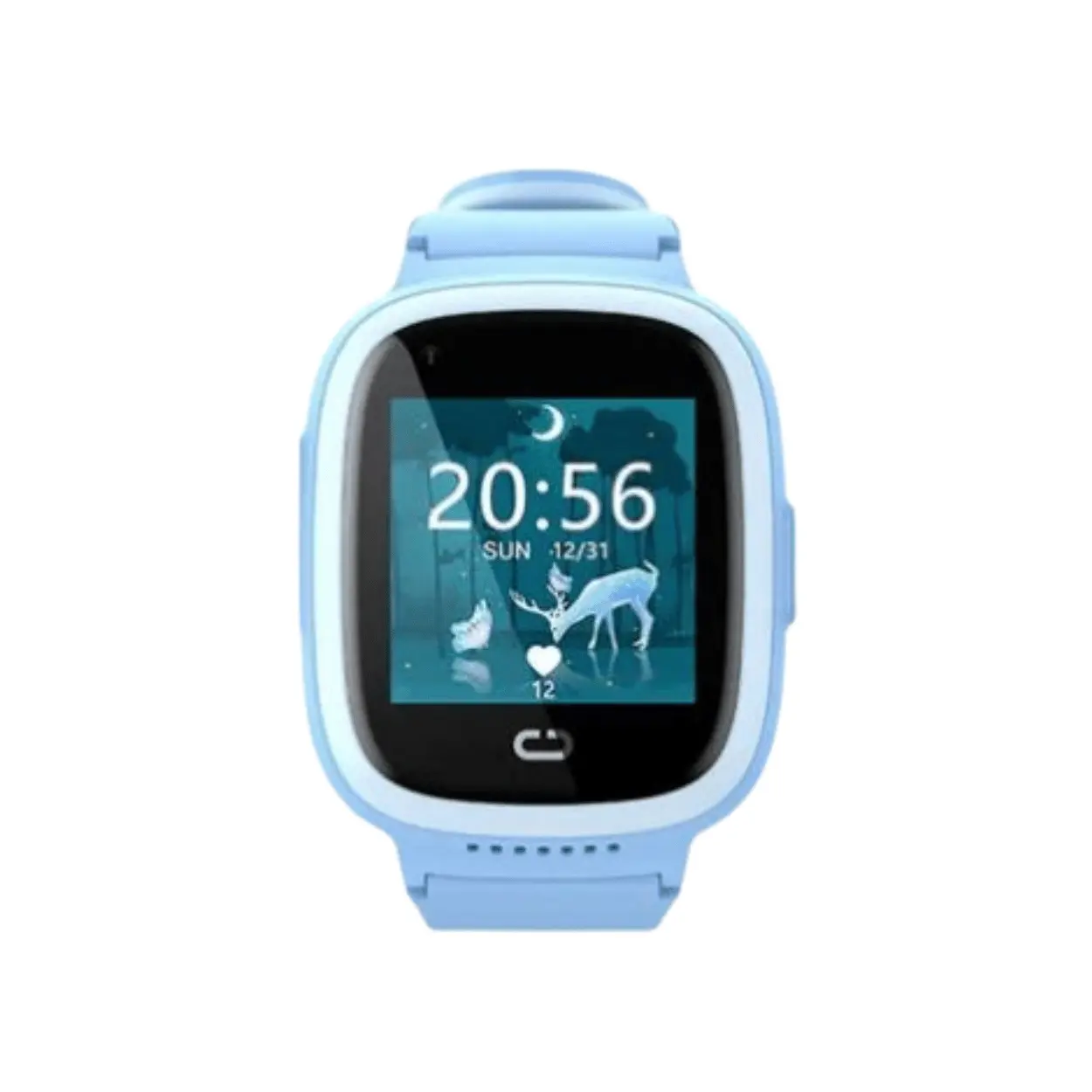
The KW11 Kids Smart Watch features a bright 1.4‑inch IPS touchscreen that responds smoothly to taps and swipes. The screen is designed to be easy for young fingers to navigate, with simple icons for calling, messaging, and viewing the time.
Key display features:
-
1.4‑inch IPS technology: Provides good visibility from different angles, making it easy for kids to use the watch indoors and outdoors.
-
Responsive touchscreen: Responds smoothly to taps and swipes, ideal for young fingers.
-
Simple icons: Easy-to-understand icons for calling, messaging, and viewing the time.
-
Bright display: Designed for good visibility in various lighting conditions.
-
Intuitive interface: Reduces the learning curve so children can start using their watch right away.
What the touchscreen offers:
-
Easy navigation: Children can easily navigate the watch’s features.
-
Clear visuals: Bright, clear display for viewing messages and caller information.
-
Kid-friendly interface: Simple icons and large buttons designed for young users.
-
Engaging experience: The colourful, responsive screen makes the watch fun to use.
IPS technology ensures good visibility from different angles, making it easy for kids to use the watch indoors and outdoors. The interface is intuitive, reducing the learning curve so children can start using their watch right away.
Interface highlights:
-
Large, easy-to-tap icons: Designed for small fingers.
-
Simple menu structure: Easy for children to navigate.
-
Colourful design: Engaging and appealing to young users.
-
Quick access: One-tap access to calling, messaging, and SOS features.
The bright, clear display makes it easy for children to see who is calling, read messages, and check the time. The responsive touchscreen ensures that the watch is easy and fun to use, encouraging children to wear it regularly.
For Android users, the clear touchscreen and intuitive interface make the KW11 Kids Smart Watch easy for children to use independently, while parents can manage settings through the companion app on their Android device.
4. Two‑Way Video Calling and Voice Communication of KW11 Kids Smart Watch
Staying connected has never been easier. The KW11 Kids Smart Watch supports video calling via the companion app or directly through VoLTE when using a compatible SIM card. This allows children to see their parents during calls, providing reassurance and strengthening the parent‑child connection throughout the day.
Communication features:
-
Two‑way video calling: See your child during calls via the companion app or VoLTE.
-
Voice calls: Simple way for kids to reach their parents with a single tap.
-
Secure phonebook: All calls are managed through a secure phonebook that parents control.
-
Approved contacts only: Ensure only approved contacts can reach the child.
-
Clear audio and video: Good quality communication for peace of mind.
What video calling offers:
-
Visual reassurance: See your child’s face and surroundings during calls.
-
Stronger connection: Video calls help maintain a strong parent-child bond.
-
Quick check‑ins: Easily see how your child is doing.
-
Peace of mind: Visual confirmation that your child is safe and happy.
Voice calls are also available, offering a simple way for kids to reach their parents with a single tap. All calls are managed through a secure phonebook that parents control, ensuring only approved contacts can reach the child.
Call management features:
-
Parent‑controlled contact list: Only approved numbers can call the watch.
-
Block unknown callers: Prevent unwanted calls from reaching your child.
-
Simple dialling: Children can call parents with a single tap.
-
SOS button: Immediate emergency call to parents.
The video calling feature is especially valuable for younger children who may find comfort in seeing their parent’s face during a call. It also allows parents to visually check on their child’s environment, providing an extra layer of safety.
For Android users, the video calling and voice communication features work seamlessly with the Android ecosystem, allowing parents to stay connected with their children directly from their smartphone. The secure phonebook ensures that only approved contacts can reach the child, providing peace of mind.
5. Secure and Durable Design of KW11 Kids Smart Watch
Built to withstand active kids, the KW11 Kids Smart Watch features a durable construction that resists bumps and scratches. The watch is designed for all‑day wear with a comfortable, adjustable strap that fits growing wrists.
Key design features:
-
Durable construction: Resists bumps and scratches from active play.
-
Comfortable, adjustable strap: Designed for all‑day wear and growing wrists.
-
Nano SIM card slot: Enables cellular connectivity for calls and tracking.
-
192MB RAM + 128MB ROM: Sufficient for running essential safety and communication features smoothly.
-
Sleek black color: Offers a unisex look that appeals to both boys and girls.
What the durable design offers:
-
Kid‑proof construction: Built to withstand the rough and tumble of active kids.
-
Comfortable wear: Adjustable strap ensures a comfortable fit throughout the day.
-
Reliable performance: Sufficient memory for smooth operation of essential features.
-
Stylish design: Sleek black color that appeals to both boys and girls.
A Nano SIM card slot enables cellular connectivity, and the watch comes with 192MB RAM and 128MB ROM—sufficient for running the essential safety and communication features smoothly. The black color offers a sleek, unisex look that appeals to both boys and girls.
Design highlights:
-
Kid‑friendly size: The watch is sized appropriately for children’s wrists.
-
Lightweight construction: Comfortable for all‑day wear.
-
Easy to use buttons: Simple controls for young users.
-
Durable materials: Built to last through daily wear and tear.
The watch is designed for all‑day wear with a comfortable, adjustable strap. The durable construction ensures the watch can withstand the active lifestyle of children, from playground adventures to sports activities.
For Android users, the secure and durable design means you can trust the KW11 Kids Smart Watch to withstand daily wear and tear while keeping your child connected. The reliable construction ensures the watch performs consistently, providing peace of mind for parents.
6. Parent‑Controlled Safety Features of KW11 Kids Smart Watch
The companion app, available for both iOS and Android, gives parents complete control over the KW11 Kids Smart Watch. From the app, you can set up geofencing to create safe zones, view the child’s location history, monitor battery status, and manage the contact list.
Safety features:
-
Geofencing: Create safe zones and receive alerts when the watch enters or leaves designated areas.
-
Location history: View your child’s location history to understand their movements.
-
Battery monitoring: Check the watch’s battery status remotely.
-
Contact list management: Manage the secure phonebook of approved contacts.
-
SOS alerts: Children can send an immediate distress signal to parents with the press of a button.
What geofencing offers:
-
Safe zones: Set up designated safe areas like home, school, or a friend’s house.
-
Instant alerts: Receive notifications when your child enters or leaves a safe zone.
-
Peace of mind: Know when your child arrives at school or returns home.
-
Customizable zones: Create multiple safe zones for different locations.
SOS emergency feature:
-
One‑press alert: Children can send an immediate distress signal with the press of a button.
-
Instant notification: Parents receive an instant alert with the child’s location.
-
Emergency contact: The SOS button calls the parent’s phone directly.
-
Extra layer of security: Provides peace of mind in emergencies.
SOS alerts allow children to send an immediate distress signal to parents with the press of a button, providing an extra layer of security in emergencies. This feature gives children a quick and easy way to call for help if they feel unsafe.
Additional safety features:
-
Remote settings management: Parents can adjust settings from the app.
-
Battery alerts: Receive notifications when the watch battery is low.
-
Location reminders: Set regular location updates for peace of mind.
-
Activity monitoring: Track your child’s daily activity and movement.
For families using Android devices, the app integrates seamlessly with the Android ecosystem, offering a familiar, user‑friendly experience. The parent‑controlled safety features give you complete control over your child’s watch, ensuring their safety and your peace of mind.
For Android users, the parent‑controlled safety features are easy to manage through the companion app, providing comprehensive control over your child’s watch. The seamless integration with the Android ecosystem ensures a smooth, reliable experience.
7. Long Battery Life and Practical Usage of KW11 Kids Smart Watch
With a focus on reliability, the KW11 Kids Smart Watch is designed to last through a typical school day and beyond. The battery life supports continuous location tracking and intermittent communication without frequent charging.
Battery highlights:
-
All‑day battery life: Designed to last through a typical school day.
-
Continuous location tracking: Supports ongoing tracking without frequent charging.
-
Intermittent communication: Battery life supports calls and messages throughout the day.
-
Magnetic charging cable: Easy to recharge overnight, ensuring the watch is ready for the next day.
What the battery life means in practice:
-
Reliable performance throughout the school day.
-
Peace of mind knowing the watch won’t run out of power.
-
Easy overnight charging for next-day readiness.
-
Continuous tracking without interruption.
A magnetic charging cable makes it easy to recharge overnight, ensuring the watch is ready for the next day’s adventures. The simple charging process is convenient for parents and children alike.
Charging features:
-
Magnetic connection: Easy to attach and detach.
-
Overnight charging: Convenient for daily use.
-
Simple setup: No complicated charging process.
-
Quick recharge: Get back to full power efficiently.
The battery life supports continuous location tracking and intermittent communication without frequent charging. This ensures that the watch is always ready when your child needs it.
For Android users, the long battery life means you can rely on the KW11 Kids Smart Watch to keep your child connected and safe throughout the day. The easy overnight charging ensures the watch is ready for the next day’s activities.
8. What’s in the Box
When you purchase the KW11 Kids Smart Watch, you can expect:
Note: A SIM card is not included. A Nano SIM card with cellular connectivity is required for the watch to function.
9. Pros and Cons of KW11 Kids Smart Watch
10. Frequently Asked Questions (FAQ)
Q1: Does the KW11 Kids Smart Watch have GPS tracking?
A: Yes, it features GPS, Wi‑Fi, and LBS positioning for reliable location tracking.
Q2: Does the KW11 Kids Smart Watch support video calling?
A: Yes, it supports two‑way video calling via the companion app or VoLTE.
Q3: Is a SIM card included with the watch?
A: No, a Nano SIM card with cellular connectivity is required for the watch to function.
Q4: Can parents control who can call the watch?
A: Yes, parents can manage a secure phonebook of approved contacts through the companion app.
Q5: Does the KW11 Kids Smart Watch have an SOS button?
A: Yes, children can send an immediate distress signal to parents with the press of a button.
Q6: What is geofencing?
A: Geofencing allows parents to set up safe zones and receive alerts when the watch enters or leaves designated areas.
Q7: Is the KW11 Kids Smart Watch compatible with Android phones?
A: Yes, the companion app works seamlessly with Android devices and integrates with the Android ecosystem.
Q8: How long does the battery last on the KW11 Kids Smart Watch?
A: The battery is designed to last through a typical school day with continuous location tracking and intermittent communication.
11. Conclusion
The KW11 Kids Smart Watch provides a thoughtful balance of safety features, clear communication, and ease of use that makes it an ideal choice for families seeking peace of mind. Its multi‑technology location tracking, video calling capabilities, and parent‑controlled settings empower children with independence while keeping parents informed and connected.
The GPS, Wi‑Fi, and LBS tracking ensure reliable location monitoring, while the two‑way video calling allows children to see their parents during calls, providing reassurance and strengthening the parent‑child connection. The parent‑controlled contact list and geofencing features give parents complete control over their child’s safety, and the SOS button provides an extra layer of security in emergencies.
Built to withstand active use and backed by an intuitive companion app that works seamlessly with the Android ecosystem, this smartwatch is a reliable companion for modern parenting. Whether your child is at school, at the park, or on a family outing, the KW11 Kids Smart Watch keeps you connected and informed.
For those looking for a safe, dependable kids’ smartwatch, the KW11 Kids Smart Watch is a wise and reassuring choice.
Visit our shop for more wearables and accessories.


 Pick up from the GEA Store
 Courier delivery
 DHL Courier delivery
 Warranty 1 year

 Enquire Now
This product has multiple variants. The options may be chosen on the product page
Enquire Now
This product has multiple variants. The options may be chosen on the product page


Reviews
Clear filtersThere are no reviews yet.