


-
 Pick up from the GEA Store
-
 Courier delivery
-
 DHL Courier delivery
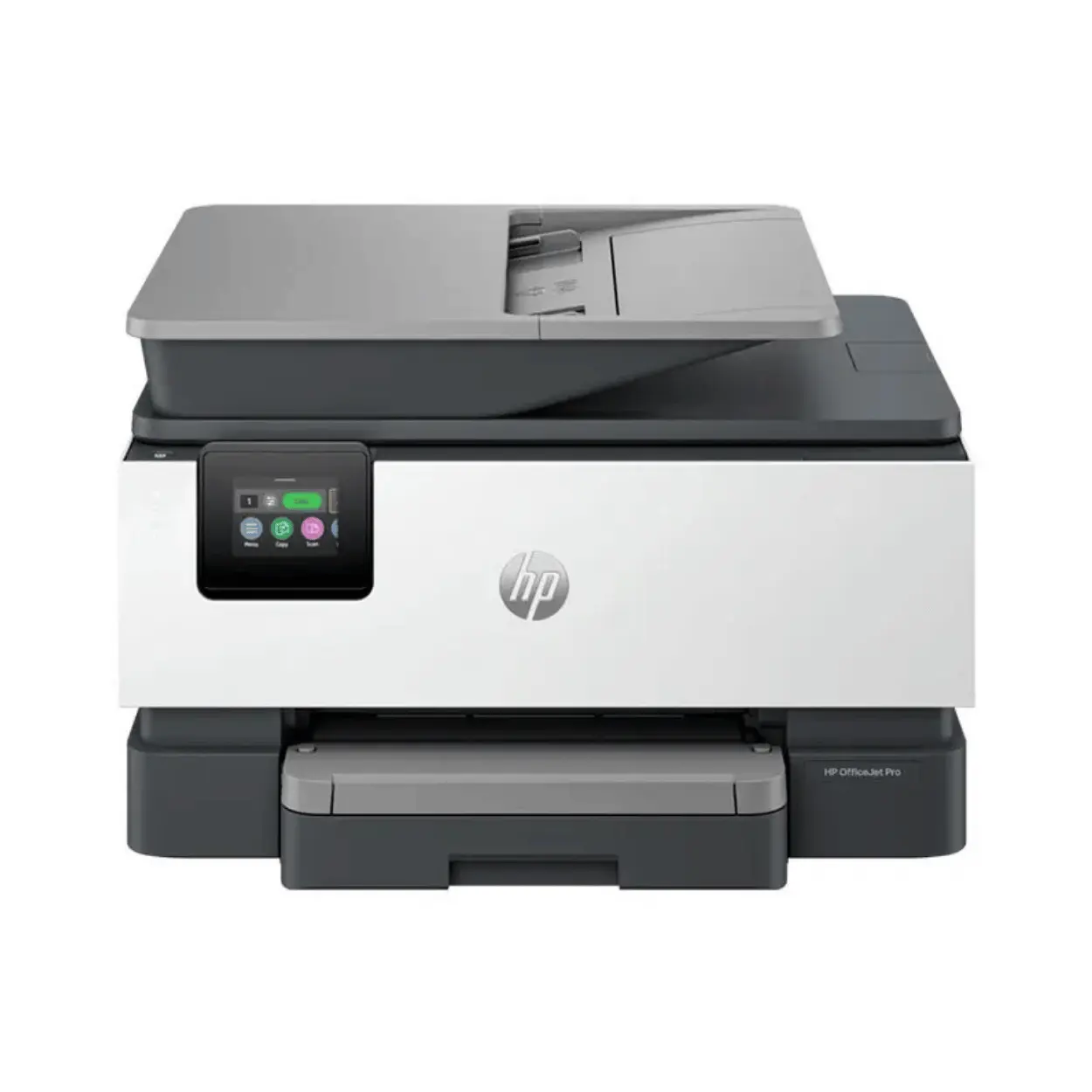
Discover the HP OfficeJet Pro 9123 AIO printer in our detailed review. Explore its 22ppm speed, robust security, and seamless mobile connectivity for your office.
KShs32,000
Pick up from the GEA Store
To pick up today
Free
Courier delivery
Our courier will deliver to the specified address
2-3 Days
Free
DHL Courier delivery
DHL courier will deliver to the specified address
2-3 Days
Free
 Warranty 1 year
Payment Methods:

| Feature | Specification |
|---|---|
| Model | HP OfficeJet Pro 9123 AIO Printer |
| Function | 4-in-1 (Print, Scan, Copy, Fax) |
| Print Speed | Up to 22 ppm (black), 18 ppm (color) – ISO laser-comparable |
| General Office Speed | Up to 32 ppm (black/color) |
| First Page Out | 10 sec (black), 13 sec (color) |
| Print Resolution | Black: 1200 x 1200 rendered dpi; Color: 4800 x 1200 optimized dpi |
| Borderless Printing | Yes (US letter, A4 photo paper) |
| Display | 2.7-inch color touchscreen |
| Paper Input | 250-sheet input tray, 35-sheet ADF |
| Output Capacity | Standard for class |
| Scan Resolution | Up to 1200 dpi optical |
| Scan Destinations | Email, network folders, USB, Google Drive, OneDrive |
| Connectivity | Hi-Speed USB 2.0, Gigabit Ethernet, Dual-band Wi-Fi (2.4/5 GHz), Wi-Fi Direct, 2x RJ-11 fax/modem ports, Front USB flash drive port |
| Mobile Printing | Mopria certified, HP Smart app, Apple AirPrint, Chrome OS |
| Security | HP Wolf Pro Security, Secure Boot, 802.1X authentication, Encryption |
| Media Types | Plain paper, envelopes, high-resolution paper, glossy media |
| Media Sizes | A4, A5, A6, B5, DL envelopes, Legal (8.5 x 14 in) |
| Dimensions | 439 x 343 x 278 mm |
| Weight | 11.08 kg |
| Monthly Duty Cycle | Up to 25,000 pages |
| Recommended Monthly Volume | Up to 2,500 pages |
| Memory | 512 MB standard |
| Ink System | HP 936 / 936e EvoMore series cartridges |
| Sustainability | >40% recycled plastic materials |
| Warranty | Standard HP warranty |
Introduction of HP OfficeJet Pro 9123 AIO Printer
Blazing Fast Performance of HP OfficeJet Pro 9123 AIO Printer
Intuitive Operation of HP OfficeJet Pro 9123 AIO Printer
Seamless Connectivity of HP OfficeJet Pro 9123 AIO Printer
Robust Paper Handling of HP OfficeJet Pro 9123 AIO Printer
Advanced Scanning of HP OfficeJet Pro 9123 AIO Printer
Enterprise-Grade Security of HP OfficeJet Pro 9123 AIO Printer
Consumables of HP OfficeJet Pro 9123 AIO Printer
Sustainability of HP OfficeJet Pro 9123 AIO Printer
Real-World User Experiences of HP OfficeJet Pro 9123 AIO Printer
What’s in the Box
Pros and Cons of HP OfficeJet Pro 9123 AIO Printer
Frequently Asked Questions About HP OfficeJet Pro 9123 AIO Printer
Conclusion – Is the HP OfficeJet Pro 9123 AIO Printer Worth It?
In today’s fast-paced business environment, efficiency, security, and professional-quality output are essential for making a lasting impression. The HP OfficeJet Pro 9123 AIO printer arrives as a purpose-built multifunction device designed specifically for small to medium-sized businesses that demand reliable print, copy, scan, and fax capabilities in a feature-rich, compact package.
As a 4-in-1 color inkjet system, this printer combines fast performance with HP’s most reliable dual-band Wi-Fi technology and robust HP Wolf Pro Security features, making it an ideal choice for teams of up to 10 users who need to produce everything from everyday documents to client-facing marketing materials. Whether you are processing invoices, digitizing records, or creating vibrant presentations, the HP OfficeJet Pro 9123 AIO printer is engineered to exceed expectations with every task.
The HP OfficeJet Pro 9123 AIO printer is engineered for businesses that demand fast performance, professional-quality output, and robust security. Whether you are a small business owner who needs reliable printing for invoices and marketing materials, a home office professional who requires versatile scanning and copying, a team leader who values mobile connectivity for remote work, or an IT administrator who appreciates enterprise-grade security features, this printer is built to meet your needs.
The combination of 22ppm print speed, 2.7-inch color touchscreen, comprehensive mobile connectivity, and HP Wolf Pro Security makes it one of the most capable and versatile multifunction printers available today.
For Android users, the HP OfficeJet Pro 9123 AIO printer integrates seamlessly with the Android ecosystem through Mopria certification and the HP Smart app, enabling native printing directly from Android smartphones and tablets. The universal compatibility and thoughtful design make it a practical choice for businesses that want a printer that works flawlessly with their devices.
If you are already using HP products, you might also enjoy our collection of HP printers for more options.
Explore more office solutions at our shop .
At the heart of the HP OfficeJet Pro 9123 AIO printer lies impressive print performance that keeps pace with demanding office workflows. It delivers print speeds of up to 22 pages per minute for black-and-white and 18 pages per minute for color documents on A4 paper under ISO laser-comparable professional mode.
Key performance features:
22 ppm black: Fast monochrome document printing.
18 ppm color: Efficient color document production.
32 ppm general office: Rapid output when needed.
10 sec first page out (black): Minimal wait times.
13 sec first page out (color): Efficient workflow execution.
1200 x 1200 dpi black: Crisp, professional text.
4800 x 1200 dpi color: Vibrant, true-to-life images.
Borderless printing: Professional marketing materials.
512 MB memory: Handles complex jobs with ease.
25,000 page duty cycle: Built for consistent performance.
What the performance offers:
Rapid output: High-speed printing for busy offices.
Professional quality: Crisp text and vibrant images.
Efficient workflow: Fast first page out for quick jobs.
Reliable performance: High duty cycle for demanding environments.
In general office mode, speeds can reach up to 32 pages per minute for both black and color, ensuring rapid output when needed. The first page out time is remarkably swift at just 10 seconds for black and 13 seconds for color, minimizing wait times and ensuring efficient workflow execution.
Print quality highlights:
Crisp text: 1200 x 1200 dpi for professional documents.
Vibrant images: 4800 x 1200 dpi on photo paper.
Borderless printing: Flyers and marketing materials.
Photo paper support: Professional-quality prints.
Print quality is exceptional for an inkjet device in its class. Black text documents benefit from a maximum resolution of up to 1200 x 1200 rendered dpi, ensuring crisp, professional-looking output suitable for business correspondence. Color prints and marketing materials reach up to 4800 x 1200 optimized dpi when printing on HP Advanced Photo Paper with 1200 x 1200 dpi input, delivering vibrant, true-to-life images that make presentations stand out.
Performance benefits for businesses:
Quick turnaround: 22ppm speed for large print jobs.
Professional output: High-resolution printing for client materials.
Efficient multitasking: 512 MB memory for complex jobs.
Reliability: 25,000 page duty cycle for demanding offices.
The printer supports borderless printing on photo paper up to US letter or A4 size, making it easy to produce flyers and marketing materials without unsightly white margins. Powered by robust internal processing and 512 MB of standard memory, the printer handles complex print jobs and multitasking with ease. The recommended monthly print volume is up to 2,500 pages, with a maximum duty cycle of 25,000 pages, indicating the device is built for consistent, reliable performance in active office environments.
For Android users, the fast performance ensures that your business printing is efficient and reliable, seamlessly integrating with the Android ecosystem for a connected office experience.
HP has prioritized user experience in the design of the HP OfficeJet Pro 9123 AIO printer, featuring a vibrant 2.7-inch color touchscreen with a phone-like user interface that provides an intuitive, smartphone-style experience for navigating the device’s extensive functionality.
Key operation features:
2.7-inch color touchscreen: Intuitive, smartphone-style interface.
Phone-like UI: Easy navigation and control.
Clear interface: Quick access to all functions.
Modern design: Cement color aesthetic blends into any setting.
Compact footprint: 439 x 343 x 278 mm.
Lightweight: 11.08 kg for flexible placement.
What the operation offers:
Easy navigation: Smartphone-style touchscreen for all users.
Quick access: Intuitive interface for printing, copying, scanning, faxing.
Professional appearance: Modern design suits any office.
Space efficiency: Compact footprint for shared spaces.
The interface is designed for clarity, making it easy for any user to access printing, copying, scanning, and faxing functions without extensive training. The physical design is equally impressive, with dimensions of 439 x 343 x 278 mm and a weight of approximately 11.08 kg, allowing it to fit comfortably in shared office spaces.
Design highlights:
Cement color: Blends into any professional setting.
Front-loading trays: Quick, hassle-free paper refills.
Accessible control panel: Easy daily operations.
Compact footprint: Fits in shared office spaces.
Its modern cement color aesthetic ensures it blends seamlessly into any professional setting. Front-loading paper trays and an accessible control panel ensure that daily operations, including paper refills and maintenance, are quick and hassle-free.
For Android users, the intuitive operation ensures that your office printing is simple and accessible, seamlessly integrating with the Android ecosystem for a connected office experience.
In today’s connected workplace, the ability to print from anywhere is essential. The HP OfficeJet Pro 9123 AIO printer delivers comprehensive connectivity options including Hi-Speed USB 2.0 (device and host ports), Gigabit Ethernet, and built-in dual-band Wi-Fi 802.11 a/b/g/n/ac supporting both 2.4 GHz and 5 GHz frequencies for stable, interference-free connections.
Key connectivity features:
Hi-Speed USB 2.0: Device and host ports.
Gigabit Ethernet: Reliable wired networking.
Dual-band Wi-Fi: 2.4 GHz and 5 GHz support.
Self-healing Wi-Fi: Automatic issue detection and resolution.
Wi-Fi Direct: Direct connections without a router.
2x RJ-11 fax/modem ports: Phone line connectivity.
Front USB flash drive port: Walk-up printing and scanning.
Mopria certification: Native Android printing.
HP Smart app: Remote printer management.
Apple AirPrint: Effortless iOS printing.
Chrome OS support: Cross-platform compatibility.
What the connectivity offers:
Flexible printing: Print from any device, anywhere.
Stable connections: Self-healing Wi-Fi for reliability.
Direct printing: Wi-Fi Direct for guest printing.
Mobile convenience: Native Android and iOS printing.
Cloud integration: Google Drive and OneDrive support.
HP’s self-healing Wi-Fi technology automatically detects and resolves connectivity issues, maintaining a stable link to your network. Wi-Fi Direct support enables direct connections from mobile devices when a network router is unavailable, perfect for guest printing or temporary workspaces.
Mobile printing highlights:
Mopria certified: Native Android printing.
HP Smart app: Full printer management.
Apple AirPrint: Effortless iOS printing.
Chrome OS: Cross-platform compatibility.
Mobile printing capabilities are exceptionally comprehensive, ensuring seamless integration with the devices your team already uses. For Android users, the HP OfficeJet Pro 9123 AIO printer is Mopria certified, enabling native printing directly from Android smartphones and tablets without requiring any additional applications.
Cloud integration:
Google Drive: Scan and print directly.
OneDrive: Streamline document workflows.
Cloud storage: Access documents from anywhere.
Remote management: HP Smart app for monitoring.
This native support leverages the built-in print services framework of the Android platform , ensuring that printing documents, emails, and web pages is always just a few taps away. Additionally, users can download the HP Smart app, which unlocks even more functionality including remote printer management, monitoring ink levels, configuring shortcuts, and initiating print jobs from anywhere.
Connectivity benefits for businesses:
Anywhere printing: Print from home, office, or on the go.
Reliable network: Self-healing Wi-Fi for stability.
Mobile integration: Native printing for Android and iOS.
Cloud access: Direct scanning and printing to cloud services.
The app enables direct printing from and scanning to cloud services like Google Drive and OneDrive, streamlining document workflows across devices. For iOS users, Apple AirPrint provides the same effortless experience, while Chrome OS support ensures compatibility across diverse IT environments.
For Android users, the comprehensive connectivity ensures that your office printing is flexible and accessible, seamlessly integrating with the Android ecosystem for a connected office experience.
The HP OfficeJet Pro 9123 AIO printer is designed to handle the diverse media requirements of a modern office. Standard paper handling includes a 250-sheet input tray and a 35-sheet Automatic Document Feeder (ADF) for efficient multi-page copying and scanning.
Key paper handling features:
250-sheet input tray: Ample capacity for continuous printing.
35-sheet ADF: Efficient multi-page document handling.
Versatile media support: Plain paper, envelopes, glossy media.
Media sizes: A4, A5, A6, B5, DL envelopes, Legal.
Borderless printing: US letter, A4 photo paper.
Front USB flash drive port: Walk-up printing and scanning.
What the paper handling offers:
Continuous workflow: 250-sheet capacity for fewer refills.
Efficient scanning: 35-sheet ADF for multi-page documents.
Versatile printing: Support for various media types and sizes.
Quick jobs: Front USB port for guest printing.
The output capacity is standard for its class, keeping finished documents neatly organized. Media versatility is impressive, supporting a wide range of paper types including plain paper, envelopes, high-resolution paper, and glossy media suitable for professional presentations.
Paper handling highlights:
250-sheet input: Reduced need for frequent refills.
35-sheet ADF: Efficient multi-page document handling.
Versatile media: Plain paper, envelopes, glossy media.
Borderless: Professional marketing materials.
Supported media sizes range from A4, A5, A6, B5, DL envelopes, and Legal up to 8.5 x 14 inches. The main tray accommodates paper weights appropriate for everyday office use, ensuring reliable feeding and professional output quality. A standout feature is the front USB flash drive port, enabling walk-up printing and scanning without a computer—perfect for quick jobs or guest users.
For Android users, the robust paper handling ensures that your office printing is efficient and professional, seamlessly integrating with the Android ecosystem for a connected office experience.
Beyond printing, the HP OfficeJet Pro 9123 AIO printer excels as a powerful document digitization hub. The integrated flatbed scanner is complemented by the 35-sheet Automatic Document Feeder (ADF) , providing versatile scanning options for both bound and loose documents.
Key scanning features:
35-sheet ADF: Efficient multi-page scanning.
Automatic two-sided scanning: Digitize double-sided documents.
Optical scan resolution: Up to 1200 dpi.
Scan destinations: Email, network folders, USB, Google Drive, OneDrive.
Scan file formats: PDF and JPEG.
Copy speed: Up to 22 copies per minute.
ID copy functionality: Easy ID card copying.
Reduce/enlarge: Flexible copying options.
What the scanning offers:
Efficient digitizing: 35-sheet ADF for large documents.
High-quality scans: 1200 dpi for detailed documents.
Flexible destinations: Email, cloud, USB, network.
Professional copying: Fast, feature-rich copier.
A key productivity feature is automatic two-sided scanning and printing (duplex) , which dramatically improves efficiency when digitizing double-sided contracts, reports, or ID cards. Optical scan resolution reaches up to 1200 dpi, ensuring that even detailed documents are captured with exceptional clarity.
Scanning benefits for businesses:
Document management: Digitize records efficiently.
Cloud integration: Scan directly to Google Drive and OneDrive.
High-quality capture: 1200 dpi for detailed documents.
Versatile output: PDF and JPEG formats.
Scanning destinations are highly versatile, with support for scanning to email, network folders, USB drives, and cloud services including Google Drive and OneDrive through the HP Smart app. Supported scan file formats include PDF and JPEG, providing flexibility for various archiving and sharing requirements.
Copying highlights:
22 copies per minute: Fast copying for busy offices.
ID copy: Easy card copying.
Reduce/enlarge: Flexible copy sizes.
Multi-copy: Multiple copies from a single scan.
Copying functions are equally robust, with copy speeds matching print performance at up to 22 copies per minute for black-and-white A4 documents. The copier includes highly practical features such as ID copy functionality, reduce/enlarge settings, and the ability to make multiple copies from a single scan.
Fax capabilities:
Integrated fax: True 4-in-1 functionality.
Dual RJ-11 ports: Phone line connectivity.
Speed dials: Quick faxing.
Fax forwarding: Automated routing.
Memory storage: Receives faxes when paper runs out.
The HP OfficeJet Pro 9123 AIO printer includes comprehensive fax functionality, making it a true 4-in-1 device. The integrated fax modem supports standard phone line connectivity via the dual RJ-11 ports, ensuring reliable communication for organizations that still rely on fax for contracts, orders, or legal documents. Fax features include speed dials, fax forwarding, and memory storage for incoming faxes when paper runs out.
For Android users, the advanced scanning and fax capabilities ensure that your office document workflows are efficient and professional, seamlessly integrating with the Android ecosystem for a connected office experience.
In an era where data breaches pose significant risks to organizations of all sizes, the HP OfficeJet Pro 9123 AIO printer comes equipped with HP Wolf Pro Security, a comprehensive suite of protection features designed to safeguard sensitive information.
Key security features:
HP Wolf Pro Security: Comprehensive protection suite.
Secure Boot: Verifies system integrity at startup.
Encryption: Industry-standard data encryption.
802.1X authentication: Network security.
Secure management protocols: Secure device management.
Front USB host port security: Prevents unauthorized access.
What the security offers:
Data protection: Safeguard sensitive business information.
System integrity: Secure Boot prevents unauthorized modifications.
Network security: 802.1X authentication for secure connections.
Access control: USB port security for physical access.
Security management includes secure boot functionality that verifies system integrity at startup, preventing unauthorized firmware modifications. The printer supports industry-standard encryption protocols to ensure that data transmitted over the network remains confidential and tamper-proof.
Security benefits for businesses:
Compliance: Meet industry security standards.
Data protection: Encrypt sensitive business data.
Network security: Secure authentication protocols.
Peace of mind: Enterprise-grade security features.
The front USB host port can be secured to prevent unauthorized access, and network security features include support for 802.1X authentication and secure management protocols. These enterprise-grade security features provide peace of mind for IT administrators and ensure that the device meets the stringent requirements of modern business environments.
For Android users, the enterprise-grade security features ensure that your business data is protected, seamlessly integrating with the Android ecosystem for a connected and secure office experience.
The HP OfficeJet Pro 9123 AIO printer utilizes HP’s 936 series ink cartridges, offering both standard and high-yield options to suit different printing volumes.
Key consumable features:
HP 936 Original Ink Cartridges: Standard black, cyan, magenta, yellow.
HP 936e EvoMore series: Enhanced page yields.
Setup cartridges: Immediate productivity out of the box.
Flexible options: Choose right balance of cost and yield.
Recommended monthly volume: Up to 2,500 pages.
What the consumables offer:
Cost-effective printing: Choice of standard and high-yield cartridges.
Immediate productivity: Setup cartridges included.
Flexible options: Choose based on printing needs.
Efficient ink usage: Minimizes long-term operating costs.
Standard HP 936 Original Ink Cartridges are available in black, cyan, magenta, and yellow. For higher-volume environments, HP offers the 936e EvoMore series cartridges, which provide enhanced page yields and additional features. This flexibility allows businesses to choose the right balance between upfront cost and page yield based on their specific printing needs.
Consumable benefits for businesses:
Cost control: Standard or high-yield options.
Productivity: Setup cartridges for immediate use.
Efficiency: Recommended monthly volume for active offices.
Value: Cost-effective printing for everyday use.
The printer ships with setup cartridges that allow immediate productivity while planning first replacements. With a recommended monthly print volume of up to 2,500 pages, the device is designed for efficient ink usage that minimizes long-term operating costs. Users report that it is “cost-effective in terms of both purchase price and ongoing ink usage.”
For Android users, the cost-effective consumables ensure that your office printing is affordable and efficient, seamlessly integrating with the Android ecosystem for a connected office experience.
HP has engineered the HP OfficeJet Pro 9123 AIO printer with sustainability as a core consideration. The device incorporates more than 40% recycled plastic materials, reducing environmental impact while maintaining durability and performance.
Key sustainability features:
>40% recycled plastic: Reduced environmental impact.
Energy-efficient operation: Meets modern environmental standards.
Ink cartridge recycling program: Responsible disposal.
Power consumption management: Reduced energy usage.
What the sustainability offers:
Environmental responsibility: Reduced plastic waste.
Energy efficiency: Lower power consumption.
Recycling program: Responsible cartridge disposal.
Sustainable design: Commitment to environmental impact.
HP’s commitment to sustainable printing extends to the ink cartridge recycling program, allowing businesses to responsibly dispose of used cartridges. Power consumption is carefully managed, with energy-efficient operation that meets modern environmental standards.
For Android users, the sustainable design ensures that your office printing is environmentally responsible, seamlessly integrating with the Android ecosystem for a connected and sustainable office experience.
Feedback from actual users of the HP OfficeJet Pro 9123 AIO printer consistently highlights its reliability, ease of use, and value proposition. With an average rating of 4.5 out of 5 stars on Amazon.sa, the printer has earned positive recognition across multiple markets.
Key user feedback themes:
Reliability: Sturdy, well-built construction.
Ease of use: Quick, hassle-free setup.
Print quality: Sharp text and vibrant colors.
Value: Cost-effective for home offices.
Versatility: Comprehensive 4-in-1 functionality.
One satisfied user describes it as a “great all-in-one printer for the home office,” noting that “with its multi-purpose capabilities — printing, scanning, and copying — it covers all my needs in one compact device, making it a perfect all-in-one solution.” They praise the “impressive” print quality, “delivering sharp text and good resolution for both documents and color prints,” and note that “setup was quick and hassle-free, with clear instructions and smooth integration with my devices.”
User testimonials:
User: “Great all-in-one printer for the home office.”
User: “Impressive print quality – sharp text and good resolution.”
User: “Setup was quick and hassle-free.”
User: “Well-built, sturdy machine that feels like it’s made to last.”
User: “Highly recommended for home office users.”
They conclude it is a “well-built, sturdy machine that feels like it’s made to last” and “highly recommended for home office users.” Another user confirms it is “very good and easy to setup,” while a third customer appreciates that it includes copy, scan, fax, and both Ethernet and Wi-Fi connectivity options.
User considerations:
Speed: One user noted it “does not print as fast as it is mentioned in the description.”
Wi-Fi setup: Some users “struggled a bit with the wifi connection at first.”
Ink recognition: Isolated incident with cartridge recognition issues.
One reviewer noted it was “easy setup,” though they observed that it “does not print as fast as it is mentioned in the description.” However, one critical reviewer reported issues: “First one arrived. It was clearly used and half set up but would not recognize the ink cartridges. Returned and ordered a replacement, it also will not recognize the Magenta cartridge. This is beyond frustrating. The quality is not what used to come from HP.” This appears to be an isolated incident, as most reviews are positive.
A Desertcart user mentioned they “struggled a bit with the wifi connection at first, but it worked out in the end.” Overall, users consistently praise the printer’s build quality, feature set, and value for money in home office environments.
For Android users, the real-world experiences demonstrate that the HP OfficeJet Pro 9123 AIO printer is a reliable and versatile office solution, seamlessly integrating with the Android ecosystem for a connected office experience.
When you purchase the HP OfficeJet Pro 9123 AIO printer, you can expect:
HP OfficeJet Pro 9123 AIO printer unit
Setup ink cartridges
Power cable
USB cable
Quick setup guide
Warranty information
| Pros | Cons |
|---|---|
| ✔️ 22 ppm print speed – Fast black and color printing | ✘ Print speed claims – Some users report slower speeds |
| ✔️ 2.7″ color touchscreen – Intuitive smartphone-style interface | ✘ Wi-Fi setup – Some users experienced connectivity issues |
| ✔️ HP Wolf Pro Security – Enterprise-grade protection suite | ✘ Ink recognition issues – Isolated cartridge recognition problems |
| ✔️ Mopria certified – Native Android printing | ✘ No display for ink levels – Check via app or PC |
| ✔️ HP Smart app – Remote printing and management | ✘ Setup cartridges – Limited yield, requires quick replacement |
| ✔️ 35-sheet ADF – Efficient multi-page document handling | ✘ No Ethernet cable included – Requires separate purchase |
| ✔️ Automatic duplex – Two-sided printing and scanning | ✘ No Wi-Fi Direct setup button – App-based setup only |
| ✔️ Versatile media support – Plain paper, envelopes, glossy media | |
| ✔️ Borderless printing – Professional marketing materials | |
| ✔️ Wi-Fi Direct – Direct printing without a router | |
| ✔️ Cloud integration – Google Drive and OneDrive support | |
| ✔️ Front USB port – Walk-up printing and scanning | |
| ✔️ >40% recycled plastic – Sustainable design | |
| ✔️ 512 MB memory – Handles complex jobs with ease | |
| ✔️ 25,000 page duty cycle – Built for active offices |
Q1: What is the print speed of the HP OfficeJet Pro 9123 AIO printer?
A: It prints at up to 22 ppm for black and 18 ppm for color (ISO laser-comparable), with up to 32 ppm in general office mode.
Q2: Does the HP OfficeJet Pro 9123 AIO printer support mobile printing?
A: Yes, it supports Mopria (Android), HP Smart app, Apple AirPrint, and Chrome OS for comprehensive mobile printing.
Q3: Is the HP OfficeJet Pro 9123 AIO printer compatible with Android devices?
A: Yes, it is Mopria certified for native Android printing and supports the HP Smart app for remote management.
Q4: What paper capacity does the HP OfficeJet Pro 9123 AIO printer have?
A: It features a 250-sheet input tray and a 35-sheet Automatic Document Feeder (ADF).
Q5: Does the HP OfficeJet Pro 9123 AIO printer support automatic duplex printing?
A: Yes, it supports automatic two-sided printing and scanning (duplex).
Q6: What security features does the HP OfficeJet Pro 9123 AIO printer have?
A: It features HP Wolf Pro Security with Secure Boot, Encryption, 802.1X authentication, and secure management protocols.
Q7: Does the HP OfficeJet Pro 9123 AIO printer have Wi-Fi?
A: Yes, it features built-in dual-band Wi-Fi (2.4 GHz and 5 GHz) with self-healing technology.
Q8: Does the HP OfficeJet Pro 9123 AIO printer have a touchscreen?
A: Yes, it features a 2.7-inch color touchscreen with a phone-like user interface.
Q9: What is the maximum duty cycle of the printer?
A: It has a maximum duty cycle of 25,000 pages with a recommended monthly volume of up to 2,500 pages.
Q10: Does the HP OfficeJet Pro 9123 AIO printer support borderless printing?
A: Yes, it supports borderless printing on photo paper up to US letter or A4 size.
Q11: What ink cartridges does the HP OfficeJet Pro 9123 AIO printer use?
A: It uses HP 936 series ink cartridges (standard) and 936e EvoMore series (high-yield).
Q12: Does the HP OfficeJet Pro 9123 AIO printer have a USB port?
A: Yes, it has a front USB flash drive port for walk-up printing and scanning, plus Hi-Speed USB 2.0 ports.
Q13: Is the HP OfficeJet Pro 9123 AIO printer environmentally friendly?
A: Yes, it incorporates more than 40% recycled plastic materials and has energy-efficient operation.
Q14: Does the HP OfficeJet Pro 9123 AIO printer have fax capabilities?
A: Yes, it is a true 4-in-1 device with integrated fax via dual RJ-11 ports.
Q15: What is the warranty on the HP OfficeJet Pro 9123 AIO printer?
A: It comes with a standard HP warranty.
The HP OfficeJet Pro 9123 AIO printer stands as a compelling choice for small to medium-sized businesses and home offices seeking a reliable, fast, and feature-rich color inkjet multifunction printer. Its combination of up to 22ppm print speeds, intuitive 2.7-inch color touchscreen interface, and comprehensive mobile connectivity—including native Mopria support for Android devices—makes it exceptionally well-suited for modern, collaborative workspaces.
With robust HP Wolf Pro Security features, versatile paper handling capabilities including a 35-sheet ADF and automatic duplexing, and the durable construction typical of HP’s OfficeJet Pro series, this 4-in-1 device delivers exceptional value for organizations that demand professional results without unnecessary complexity. The 512 MB memory and 25,000 page duty cycle ensure reliable performance for active office environments.
For Android users, the HP OfficeJet Pro 9123 AIO printer integrates seamlessly with the Android ecosystem through Mopria certification and the HP Smart app, enabling native printing and remote management from smartphones and tablets. The thoughtful design, energy-efficient operation, and positive user feedback regarding print quality, ease of use, and reliability further reinforce its position as a smart investment.
For any business looking to streamline document workflows while maintaining robust security and professional color output, the HP OfficeJet Pro 9123 AIO printer is a wise and dependable choice.
Visit our shop for the best deals on HP printers and office accessories.
In stock
In stock
 Enquire Now
This product has multiple variants. The options may be chosen on the product page
Enquire Now
This product has multiple variants. The options may be chosen on the product page
In stock
Enquire Now
This product has multiple variants. The options may be chosen on the product page
In stock
In stock
Enquire Now
This product has multiple variants. The options may be chosen on the product page
No account yet?
Create an Account



Reviews
Clear filtersThere are no reviews yet.