


-
 Pick up from the GEA Store
-
Courier delivery
-
DHL Courier delivery




KSh 10,000.00 Original price was: KSh 10,000.00.KSh 8,000.00Current price is: KSh 8,000.00.
 Pick up from the GEA Store
 To pick up today
Free
 Courier delivery
 Our courier will deliver to the specified address
2-3 Days
Free
 DHL Courier delivery
 DHL courier will deliver to the specified address
2-3 Days
Free
 Warranty 1 year
 Payment Methods:

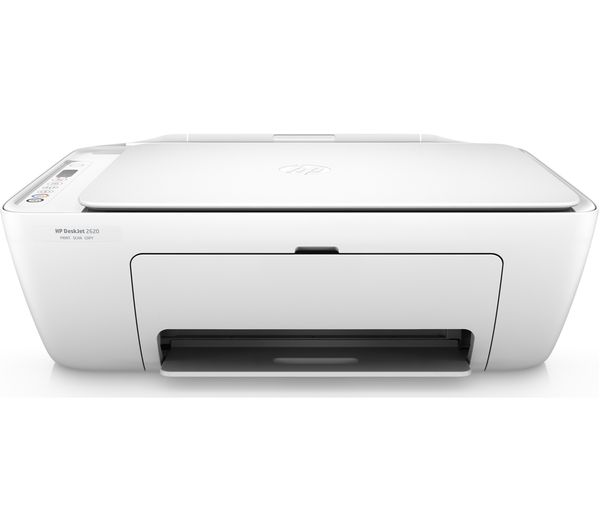
HP DeskJet 2320 Review: The Essential Home Printer for Everyday Tasks. Discover the HP DeskJet 2320 in our detailed review. Explore its print, scan, and copy functions, user-friendly setup via the HP Smart app, and reliable performance for home use.
In a world where printing needs range from school assignments to important documents, the HP DeskJet 2320 arrives as a straightforward and affordable solution for home users. This no-fuss, all-in-one inkjet printer is designed to handle the essential functions—print, copy, and scan—without overwhelming the user with complex features or a high price tag . It’s an ideal choice for students, families, or anyone who needs a reliable machine for occasional, everyday use. The HP DeskJet 2320 focuses on delivering the core functionalities you expect, providing a simple and effective way to manage your basic document needs from the comfort of your home .
The HP DeskJet 2320 is built around the fundamental tasks of printing, copying, and scanning. Powered by HP Thermal Inkjet technology, it delivers print speeds of up to 7.5 pages per minute for black-and-white documents and up to 5.5 pages per minute for color prints under ISO standards . For quick, informal prints, you can use draft mode, which boosts speeds up to 20 ppm for black and 16 ppm for color . When it comes to quality, the printer produces sharp text with black print resolution up to 1200 x 1200 rendered dpi, and vibrant color documents with resolutions up to 4800 x 1200 optimized dpi on select HP photo papers .
For copying, the HP DeskJet 2320 offers straightforward functionality with black-and-white copy speeds up to 6 cpm and color copies up to 3 cpm, with a maximum of 9 copies from a single scan . The flatbed scanner uses Contact Image Sensor (CIS) technology and provides an optical scan resolution of up to 1200 dpi, allowing you to capture and digitize documents or photos with good clarity . It supports common file formats like JPEG, TIFF, PDF, BMP, and PNG for saving your scanned work .
One of the standout aspects of the HP DeskJet 2320 is its emphasis on a simple, user-friendly experience. The initial setup is designed to be quick and hassle-free, primarily guided by the HP Smart app . This application, available for various platforms including the Android platform, provides step-by-step instructions to get your printer up and running in just a few minutes . The printer features a clean, compact design with a 60-sheet input tray and a 25-sheet output tray, fitting easily into a home office or study corner .
However, users should note a few key operational details. The HP DeskJet 2320 is a USB-only printer and does not support wireless or network connectivity, meaning it must be directly connected to a computer with a USB cable . Importantly, this USB cable is not included in the box and must be purchased separately . Additionally, the printer features manual duplex printing, so you’ll need to manually flip pages to print on both sides . The control interface is basic with no display screen, so all operations and settings are managed through your computer .
User feedback for the HP DeskJet 2320 paints a picture of a device that effectively serves its purpose for basic home use. Many users describe it as having a “very good quality/price ratio,” noting that it is “simple and practical to set up” and “does the job” for everyday printing . The print quality for regular text documents and copies is generally considered good for its class .
The printer uses HP 305 series ink cartridges. It ships with setup cartridges, and replacement options include standard and high-yield (XL) versions to manage ongoing costs. The standard black cartridge yields about 120 pages, while the XL version yields around 240 pages; the standard tri-color cartridge yields approximately 100 pages, and the XL version yields about 200 pages . Some users have pointed out that these cartridges can deplete quickly with regular use, which is an important factor in the total cost of ownership . One user explicitly noted that the “cartridges scroll at high speed,” making the printer more suitable for occasional rather than heavy use .
The HP DeskJet 2320 stands as a practical, no-nonsense choice for home users who need a reliable printer for basic, everyday tasks. Its straightforward design, essential print-copy-scan functionality, and easy setup via the HP Smart app make it incredibly accessible . While its USB-only connectivity, lack of automatic duplexing, and the ongoing cost of replacement cartridges are important considerations, it offers strong value for its primary audience . For students, families, or anyone seeking an “essential” and affordable printer for light use, the HP DeskJet 2320 is a sensible and dependable option that handles the fundamentals well.
In stock
 Enquire Now
This product has multiple variants. The options may be chosen on the product page
Enquire Now
This product has multiple variants. The options may be chosen on the product page In stock
Enquire Now
This product has multiple variants. The options may be chosen on the product page No account yet?
Create an Account


Reviews
Clear filtersThere are no reviews yet.