


-
 Pick up from the GEA Store
-
Courier delivery
-
DHL Courier delivery



KSh 26,500.00
 Pick up from the GEA Store
 To pick up today
Free
 Courier delivery
 Our courier will deliver to the specified address
2-3 Days
Free
 DHL Courier delivery
 DHL courier will deliver to the specified address
2-3 Days
Free
 Warranty 1 year
 Payment Methods:

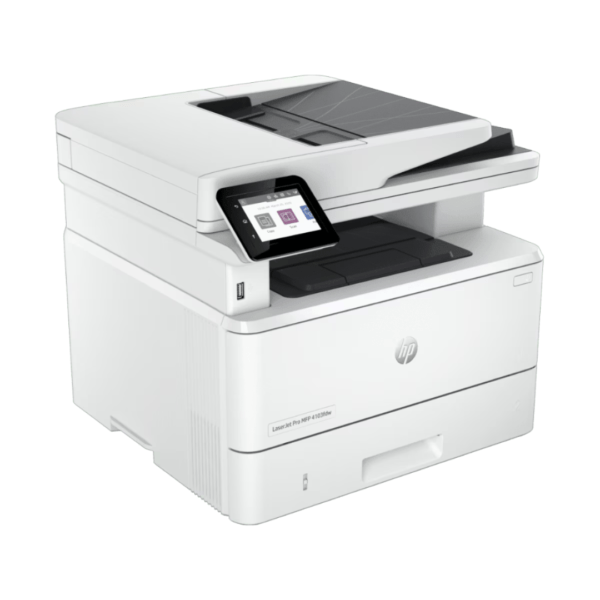
HP LaserJet MFP M141w Review: A Compact Mono Laser Printer for Home. Discover the HP LaserJet MFP M141w in our detailed review. Explore its compact design, wireless printing, and reliable performance for home offices.
In the modern era of remote work and flexible schedules, having a dependable printing solution that doesn’t dominate your desk space is essential. The HP LaserJet MFP M141w arrives as a purpose-built monochrome multifunction printer designed specifically for home offices and small workgroups that need reliable print, copy, and scan functionality in a compact, affordable package . As HP’s smallest multifunction laser printer in its class, this device combines essential features with wireless convenience, making it an ideal choice for users who prioritize space efficiency without compromising on performance . Whether you are printing homework assignments, scanning important documents, or copying identification cards, the M141w is engineered to handle everyday tasks with remarkable ease.
The first thing you will notice about the HP LaserJet MFP M141w is its incredibly compact design. Measuring just 360 x 264 x 197 mm and weighing approximately 5.1 kg, this printer occupies minimal desk space while delivering full multifunction capabilities . Its clean white aesthetic and simple design language ensure it blends seamlessly into any home office environment, whether perched on a desk or tucked away on a shelf . Users consistently praise its small footprint, with one reviewer noting it is “ideal for desktop” use and another describing it as a “compact, light-weight, space-saving printer that meets all the functions of a small home office” . The front-loading paper tray and accessible control panel ensure that daily operations remain convenient despite the reduced dimensions.
At the heart of the HP LaserJet MFP M141w lies dependable print performance that keeps pace with everyday home and small office demands. It delivers print speeds of up to 20 pages per minute for A4 documents and up to 21 pages per minute for letter-sized paper, with a swift first page out time of just 8.5 seconds from ready mode . Print resolution reaches up to 600 x 600 dpi, ensuring that text appears crisp and professional-quality suitable for documents, reports, and correspondence . The printer utilizes a single HP 150A Black toner cartridge (W1500A), simplifying replacement and maintenance . With a recommended monthly print volume of 100 to 1,000 pages and a maximum duty cycle of up to 8,000 pages, the device is built for light to moderate use typical of home and small office environments .
It is important to note that the HP LaserJet MFP M141w does not feature automatic duplex printing. Users needing double-sided output must manually flip pages, a consideration for those who frequently print two-sided documents . However, for most home users, this trade-off is acceptable given the printer’s affordable price point and compact size .
In today’s connected world, wireless printing capability is essential, and the HP LaserJet MFP M141w delivers comprehensive connectivity options. It features built-in dual-band Wi-Fi 802.11b/g/n supporting the 2.4 GHz frequency, along with Bluetooth Low Energy (BLE) for simplified setup . Wi-Fi Direct support enables direct connections from mobile devices even when a network router is unavailable, perfect for guest printing or environments without established Wi-Fi networks .
Mobile printing capabilities are exceptionally comprehensive, ensuring seamless integration with the devices your family or team already uses. For Android users, the HP LaserJet MFP M141w is Mopria certified, enabling native printing directly from Android smartphones and tablets without requiring any additional applications . This native support leverages the built-in print services framework of the Android platform, ensuring that printing documents, emails, and web pages is always just a few taps away. Additionally, users can download the HP Smart App, which unlocks even more functionality including remote printer management, monitoring toner levels, and initiating print jobs from anywhere . The app also enables scanning directly to your smartphone and sharing to cloud services like Dropbox and Google Drive . For iOS users, Apple AirPrint provides the same effortless experience, while support for Windows 11, 10, and macOS ensures compatibility across diverse operating systems .
HP has prioritized simplicity in the design of the M141w’s user interface. The control panel features eight buttons including Power, Cancel, Copy, ID Copy, Wireless, Copy setting, Up, and Down, complemented by four LEDs indicating Ready/Power, Error, Toner, and Wireless status . This straightforward layout makes navigation intuitive, allowing any user to access core functions without consulting a manual. Users report that setup is quick and straightforward, with one reviewer noting they “didn’t even look at the manual before using it for the first time” .
A standout feature for everyday use is the one-touch ID copy function, which allows users to easily copy both sides of an identification card onto a single side of a page without complex manual alignment . This proves invaluable for HR departments, registration desks, or any situation requiring quick document duplication. The copier offers up to 99 copies with reduce/enlarge settings from 25% to 400%, providing flexibility for various copying needs .
The HP LaserJet MFP M141w includes a capable flatbed scanner utilizing CIS (Contact Image Sensor) technology . With optical scan resolution up to 600 ppi and 24-bit color depth, the scanner captures documents with sufficient clarity for archiving and sharing . Users can scan to a variety of destinations including email, network folders, and directly to the HP Smart app on mobile devices . Supported scan file formats include JPG, RAW (BMP), PNG, TIFF, and PDF, providing flexibility for various archiving and sharing requirements . The scanner accommodates documents up to 216 x 297 mm, handling standard A4 and letter-sized materials with ease .
Users appreciate the convenience of scanning through the HP Smart app, with one reviewer noting the ability to “share to Dropbox, Google Drive, email, or the cloud” directly from their smartphone . The scanner’s TWAIN and WIA compatibility ensures integration with a wide range of document management software, making it suitable for both personal and professional use .
The HP LaserJet MFP M141w features a 150-sheet input tray that accommodates up to 10 envelopes, providing sufficient capacity for most home and small office needs without constant refilling . The output bin holds up to 100 sheets, keeping finished documents neatly organized. Media versatility is appropriate for its class, supporting plain paper, envelopes, postcards, and labels . Supported media sizes include A4, A5, A6, C5 envelopes, DL envelopes, and custom sizes from 105 x 148 mm to 216 x 355.6 mm . The main tray accommodates paper weights from 65 to 120 g/m², suitable for everyday printing tasks .
The paper tray location at the front of the device receives positive feedback from users who appreciate the easy access for refilling . However, some users note that the tray is relatively short, occasionally causing paper to hang out slightly, though this does not affect feeding reliability for most media types .
The HP LaserJet MFP M141w utilizes the HP 150A Black toner cartridge (W1500A), which yields approximately 1,000 pages based on the starter cartridge included in the box . Replacement cartridges are available through HP and authorized retailers, with yields of approximately 975 pages for standard cartridges . While some users express concern that replacement toner costs represent a significant percentage of the printer’s original price, others note that the availability of compatible cartridges in the market helps manage long-term operating expenses .
The printer is designed for low-maintenance operation, with user-replaceable consumables that are easy to access and replace. HP’s dynamic security measures mean the printer is intended to work with cartridges that have a new or reused HP chip, which users should consider when sourcing replacement toner .
Feedback from actual users of the HP LaserJet MFP M141w consistently highlights its compact size, ease of use, and reliable print quality. One user describes it as “value for money” that is “really worth for the money,” praising the straightforward user guide and quick delivery . Another reviewer notes it is a “good printer in its class for home” that is “compact, good priced and reliable with reasonable good print quality” .
Users particularly appreciate the wireless connectivity, with one noting that “set up and wifi connection were a breeze with HPSmart installed” and that printing was ready “in 5 minutes or so” . The quiet operation during printing receives positive mentions, contributing to a comfortable home office environment. Several users mention the printer’s compatibility with Mac iOS and Windows 11 as a significant advantage .
However, some users report challenges. Several reviewers experienced difficulties with Wi-Fi setup, with one noting they “couldn’t connect via Wi-Fi” despite numerous attempts . Occasional paper feed issues are mentioned, with some users receiving “out of paper” errors even when paper is properly loaded . The manual duplex printing requirement receives mixed feedback, with users noting that “all laser printers should be automatic in double-sided printing” . Additionally, the inability to scan directly to a USB drive means users must rely on the HP Smart app or computer connection for scanning .
HP has engineered the LaserJet MFP M141w with energy efficiency as a consideration. The device features HP Auto-On/Auto-Off Technology, which significantly reduces energy consumption during periods of inactivity . Power consumption is carefully managed, with typical electricity consumption (TEC) rated at 0.255 kWh per week for Energy Star 3.0 and 0.259 kWh per week for Blue Angel standards . While the device is not ENERGY STAR certified, its efficient design contributes to reduced utility costs and a smaller environmental footprint . The printer operates within recommended temperature ranges, ensuring reliable performance in various home office environments.
The HP LaserJet MFP M141w is ideally suited for home users, students, and small offices with light to moderate printing needs. Its compact design, wireless connectivity, and essential multifunction capabilities make it a perfect choice for those who need a reliable monochrome printer without the complexity and space requirements of larger office devices. The inclusion of ID copy functionality and the HP Smart app for mobile printing adds significant value for everyday users.
In conclusion, the HP LaserJet MFP M141w successfully delivers on its promise of providing efficient, space-saving printing for home and small office environments. Its combination of up to 20ppm print speeds, intuitive controls, and comprehensive mobile connectivity—including native Mopria support for Android devices—makes it exceptionally well-suited for modern, flexible workspaces . While the manual duplex printing and lack of USB scan may limit its appeal for users with more demanding requirements, for the target audience of home users and small offices seeking a dependable, compact monochrome MFP, the HP LaserJet MFP M141w represents a smart and affordable investment that will handle everyday tasks with reliable performance for years to come.
In stock
 Enquire Now
This product has multiple variants. The options may be chosen on the product page
Enquire Now
This product has multiple variants. The options may be chosen on the product page In stock
Enquire Now
This product has multiple variants. The options may be chosen on the product page No account yet?
Create an Account


Reviews
Clear filtersThere are no reviews yet.